

Mom passed earlier this year, so the FreeCell score record won't ever increment again, but I still made a point to back it up one last time when going through her desktop this summer.
Oldest GUI application that still runs on Windows 11 (blog.enlyth.com)
398 pointsby enlyth14 hours ago229 comments
anticorporate 10 hours ago
One crucial part of my role as my family's de facto IT support was making sure my mom's FreeCell score record (which was just a Windows registry value) made it from each computer to the next across countless upgrades. She hated the new version that came out somewhere along the way because the card decks changed. (Windows 7? Windows 10? I switched to Linux full time in the XP era so my memory is a little fuzzy.) So I made sure to keep a backup of the Win32 version she was used to, and loaded it onto every machine she ever owned. It wasn't quite the 33 years of its lifetime, but probably close to 30.
vitaflo 10 hours ago
I’m sorry for your loss. That is a wonderful story.
valeena 10 hours ago
Thank you for sharing this. It was heartwarming to read!
zoeysmithe 9 hours ago
I'm so sorry for your loss, but now you have to tell us her high score!
queenkjuul 9 hours ago
She was right, the modern freecell sucks
johnwalkr 9 hours ago
Sorry for the loss, are you able to keep her high score saved too?
I wanted old school MS solitaire in windows 11 since the modern version has ads and extra useless features. I found that the Windows XP version works without hassle. Earlier versions aren't really different but I forget if I tried to run earlier versions. One quirk: however the winning animation is programmed, it takes almost 20 minutes to complete on a very wide monitor[1].
strotter 8 hours ago
If you want to scratch your old-school solitaire itch, check out
https://freesolitaire.win
solyin 3 hours ago
it was fun until the end which was a temu ad. Before that there was an emoji that said end automatically, which was no fun. and then there was no cool card shuffling at the end.
Don't visit the link, unless you like feeling let down.
poglet 2 hours ago
> are you able to keep her high score saved too?
The score is a value stored in the Windows registry, the poster probably re-created (or imported from a previous export) the registry entry upon each Windows installation.
enlyth 8 hours ago
<3
layer8 8 hours ago
I’m still installing the classic (Windows 7) calculator [0] on each new Windows setup.
byte_0 6 hours ago
My condolences. Such a nice way to honor her memory with one more backup.
lproven 5 minutes ago
This is one of those moments you are surprised to learn when someone has discovered something you just knew.
Freecell was the demo app in Win32s for Windows 3. It is thus several years older than NT as a retail OS.
I have downloaded Win32s and extracted Freecell from it, just to play the game on Win10 LTSC and Win11. Probably more than once in fact.
The default Freecell in 21st century Windows is an ugly blinged-out mess, and in minimal installations, there are no games at all. This is the quick easy way around it.
drnick1 13 hours ago
I deplore the day we lost the menu bar and replaced it with "mobile first" designs. The desktop UI was perfected around the time of Windows 95 and has gotten worse with every iteration since then. That, and the increased reliance on non-native frameworks and libraries instead of working with directly with the Windows API in C.
excalibur 13 hours ago
> The desktop UI was perfected around the time of Windows 95 and has gotten worse with every iteration since then.
Well that can't be entirely true, the desktop experience on Windows 10 improved on Windows 8 by leaps and bounds.
MattPalmer1086 12 hours ago
Haha, yes. It does not account for releases which made UX dramatically worse (win 8) which were then reverted to some extent.
Borg3 12 hours ago
Are you nuts? Or wait.. you must be Gen Z then, never really used Win95..
If so, you cant make any statements in the subject.
I still run Windows Classic GUI here, because its fast and confortable to use. Can you do better? Hmm, maybe. But im not conviced :)
thesdev 12 hours ago
I think they were referring to the latter part (downhill ever since) and not the former (win 95 is the best).
How are you running the classic GUI?
Borg3 12 hours ago
Im still running Win2003 here, hence classic GUI (Win2000 like). Works like a charm :) I do some hacking (programing, reverse engineering) and playing games (old of course) on it.
PorciiVorbesc 12 hours ago
>Are you nuts? Or wait.. you must be Gen Z then, never really used Win95.. If so, you cant make any statements in the subject.
What a terrible attitude to have as a comment reply. I've been using Windows since Windows 95, meaning I have plenty of experience and some emotional attachment to it and I'm as millenial with knee pain as they get, so not Gen-Z, and I can't imagine going back to using W95 today productively in a non-ironic way.
Windows 95 was perfect ... for what people did on computers back in 1995, not for what I do now in 2026 on the HW of today. May W95 rest in peace, but I'll take my modern OS for my moderns entertainment and productivity tasks on modern HW. There's no way in hell I'd want to go back to W95 even if that's what popped my cherry. People calming otherwise have rose tinted glasses and only remember the good parts of that era without the downsides.
Borg3 12 hours ago
Can you tell me more? What are you doing that good old classic windows would be barely usable? Im really curious, because I was using corporate Win10 and hell, it was really driving me crazy. Good that there is Cygwin, so I could move most stuff there. Classic Windows just works, and if you care, you can even customize it.
PorciiVorbesc 12 hours ago
>Can you tell me more? What are you doing that good old classic windows would be barely usable?
In modern WIndows, from 7 onward, I can hit the meta key and type the first letters of the app I want to open, hit enter and boom, it's opened. I can mouse snap the two app windows side by side on my large monitor. I have 125% scaling so things don't look tiny on my 4k monitor.
Win 95 had none of that, the only way to launch an app was via shortcuts on the desktop or navigating a long and tedious star menu tree, which was perfectly fine for 1995 since you had ~10 app on your PC and you used it sparingly, but is really shit UX if your PC has 50+ apps like in 2026 and you use it for half a day. "Classic windows" only makes sense if you also use your PC in a classic way like it's the 90's, with like 1-2 concurrent apps opened at once, instead of 10+ leaving them on for days/weeks.
>Good that there is Cygwin, so I could move most stuff there.
Cygwin is CLI, not UI, which is what we were talking about. Are your complaints about the Windows CLI or about UI, because those are different topics you seem to mix up?
>Classic Windows just works, and if you care, you can even customize it.
I can also customize modern Windows, at least in the ways I need it to be productive. Sure, you can't customize it anymore in the W95 way, such as having a Matrix screensaver or Rollercoaster Tycoon theme on it, but I don't need that anymore since I'm old now and don't have time for that anymore. If I want a short hit of nostalgia I boot up my vintage Windows XP machine, but that's not my daily driver.
>Im really curious, because I was using corporate Win10 and hell, it was really driving me crazy.
If Win10 was driving you crazy, then "classic windows" would also drive you crazy even harder because it doesn't have any QoL over Win10. Please explain yourself here what you mean since you seem to be contradicting yourself. Or are you only talking about your limited corporate windows experience and and not what you can do as an admin on "home" windows?
jpc0 11 hours ago
> In modern WIndows, from 7 onward, I can hit the meta key and type the first letters of the app I want to open, hit enter and boom, it's opened.
I mean in theory I can also do that on my Win 11 machine... In practice if I actually performed those exact steps I will probably have edge open up with a web search of the letters I typed.
The amount of times I actually have to use the now even less user friendly way of finding an app in the start menu regardless is infuriating, give me both, a star menu that is deterministic and a search that works...
Just because I want the older stuff does not mean I have to give up some of the newer stuff.
PorciiVorbesc 11 hours ago
> In practice if I actually performed those exact steps I will probably have edge open up with a web search of the letters I typed.
Not for me since I disabled web search feature of the start menu, but I get what you mean. I still prefer this option than being limited by the Win95 way. I always have 10+ apps opened at once. Having to manually launch them via the menu tree every time I boot up my OS would be a nightmare. This wasn't an issue in Win95 because I only had 16mb of RAM so I only launched one or two apps simultaneously, like for example MS Word for a school project and Winamp for listening to music while working and that's it. The kind of multitasking people do today without even thinking (50+ Chrome tabs, IDEs, Discord, Signal, Spotify, Steam, WSL, Plex, etc) was unheard of in Win95.
>Just because I want the older stuff
Yes, but you failed to explain exactly what "old stuff" UI did Win95 had that you don't have today and really need? You can still launch apps via the desktop shortcuts or the tedious start-menu tree view in Modern Windows as well like it's 1995, if that's what you miss from Win95, nobody forces you to use the broken search feature you dislike of modern windows.
lunar_rover 14 minutes ago
Scrolling through multiple lists for example. Windows 10 allows scrolling hovered lists like on macOS and various other systems, in previous versions the scroll wheel always scrolls the current focus and 3rd party implementations are never 100% reliable.
---
Aero is a thorough evolution of the Windows UX, I think many people never realised just how much it improved when praising XP and prior.
ChrisClark 12 hours ago
Typical insulting boomer reply. Personal attacks, against the rules, and nothing useful added to the discussion. And the guy you insulted isn't even Gen Z...
4ggr0 2 hours ago
not sure if "can't say that X is the best if you haven't personally lived through every previous iteration" is an already established logical fallacy, but damn does it fall apart quickly.
john01dav 12 hours ago
> Well that can't be entirely true, the desktop experience on Windows 10 improved on Windows 8 by leaps and bounds.
In large part, windows 10's ui is more like that of windows 95 because it undid the changes away from the windows 95 paradigm that windows 8 did. Furthermore, those changes away from windows 95 in windows 8 were the exact kind of thing that might be called "mobile first".
theandrewbailey 12 hours ago
I can't tell if this is sarcasm. Windows 8 is a very low bar in terms of desktop UI. It was universally panned as a regression.
nubinetwork 12 hours ago
Not until they settle on one control panel.
layer8 11 hours ago
Only because Windows 8 was such a dramatic step back. Windows 7 is still better than Windows 10 in terms of UI.
bcvvvy 13 hours ago
I am fairly bothered about that but the one that really gets to me is the inconsistency of user interfaces across applications.
This precisely coincides with the web developers being allowed to wrap stuff into "apps" in Electron and the like.
ChrisClark 12 hours ago
It's been that way forever, did you forget about the Borland buttons? Colorful icons on them, much bigger, different shading.
gmueckl 11 hours ago
But they were not too far removed from how the standard Windows buttons looked. Office had its own look in a lot of ways back then, e.g. with the extra handles on the toolbars.
Now, if I take a couple of current applications, the differences are much bigger: from the top of my head, Explorer, Settings, Edge, Office, Steam, Spotify all have much more unique UIs.
layer8 11 hours ago
They had a different look, but usage and UI conventions including keyboard navigation worked basically the same. Since the mixing of mobile and desktop with web technology, it’s the Wild West.
bombcar 9 hours ago
There was a short period of time around Windows 95-XP where application developers really wanted to try to use the "latest and greatest" because if they didn't they really stood out as being "last year's tech".
Then XP kind of broke that as so many started not bothering and then it all went sideways.
dpark 13 hours ago
> we lost the menu bar and replaced it with "mobile first" designs
What does this mean? I use lots of apps that still have a menu bar.
Some apps eschew it, like browsers, but not because they are “mobile first”, but because they are trying to maximize screen space.
Narishma 12 hours ago
> but because they are trying to maximize screen space
If that was the case they wouldn't put giant margins around every UI element and dead space everywhere.
dpark 10 hours ago
My browser doesn’t have a bunch of dead space. No footer. One line for controls. Tabs have been collapsed into the title bar.
breakwaterlabs 12 hours ago
> they are trying to maximize screen space.
Ironic to say on hackernews which shows massive whitespace in the margins-- and if I try to widen my tab sidebar it actually indents the margin rather than eating into it.
One can look across the computing space as a whole and see that, it is surely not the case that we're "maximizing screen space".
LeFantome 11 hours ago
Totally agree. But this does not take away from his point that maximizing screen space is the motivation in Firefox. In fact, all you have done is demonstrate why they are driven to do so.
jrumbut 11 hours ago
Maximized screen space doesn't really benefit this site.
The key element missing from this thread is that the Internet going from a text based to a multi-media (and increasingly video-centric) experience.
A lot of Internet users, at this point, do as much reading on their phone or laptop as I do reading on my TV (almost none).
someguyiguess 11 hours ago
You think Hacker News’ design is new? It’s looked exactly the same since I started using it over a decade ago.
drnick1 11 hours ago
> Some apps eschew it, like browsers, but not because they are “mobile first”, but because they are trying to maximize screen space.
I don't think this is true. If anything, we see more oversized buttons and empty space nowadays. It's as if developers forgot that PC users have keyboards and mice. Remember, display resolutions and monitors were a lot smaller back then, and making space count was arguably more important 20 years ago than it is today.
dpark 10 hours ago
Two things can both be true. An app can create more space around controls and get rid of the menu bar to save space.
The space also really has nothing to do with “mobile first”. It’s for touch screens (and also modern aesthetic that avoids crowded controls).
To be clear, I am not saying that all apps are optimizing for saving screen space. I was specifically talking about browsers, which are broadly optimized to give as much area as possible to the content.
xp84 9 hours ago
You’re getting closer… “crowded” and “cluttered” are the most taboo words in the “UX” charlatans’ holy book. It’s so scary to them that they’ll sacrifice anything to avoid even a possible accusation of “crowdedness.”
It was a mildly useful point of view when they were designing things meant to be the first computer program someone might ever use. Like Microsoft Bob or Apple “At Ease.” But it’s idiotic to have things following that dogma as the only interface to tools that people need to use daily and will become expert users of.
To think some of us nerds complained about the Luna theme of XP as too “Fisher Price.” Fisher Price products look like industrial control panels compared to today’s contemporary operating systems and apps.
Melatonic 4 hours ago
Smaller screen also means your menu bar has to be larger relative to the total screen size to be readable though. Assuming something like the standard going from 15" or 17" CRT to 24" LCD
xp84 9 hours ago
> I use lots
Oh really? I, sadly, use nearly none. Open on my desktop right now: Slack, Outlook, Zoom, Windows Terminal, Edge, Claude, Obsidian, whatever the Windows image viewer is called, Cursor, and VS Code.
Only the last 2 have menu bars. And I can’t be certain that I didn’t dig through the preferences of one or both of them when I first installed them to tell them to knock off the bullshit and give me back the menus. Once in a while, there is an option buried somewhere like that.
dpark 9 hours ago
In fairness I did not do a full inventory of all the apps I use. I see Word and VS Code. It may be less than I thought if I inventoried every app I regularly use.
I see some have gone the “browser” direction with tabs folded into the title bar and the menu bar dropped. Windows Terminal, File Explorer, and Notepad are all that style now.
Edit: Actually Notepad has the tabs in the titlebar thing but retained the menu bar and folded it into the command bar.
xp84 9 hours ago
I personally am pretty disgusted by ‘tabs in the title bar’ since really what that means is deleting the title bar. You can’t grab and move the freaking window because most of it is made out of a bunch of tabs or other widgets. I presume this is done because somebody’s research found that many people just do everything in maximized windows or the Apple “full screen mode.” As long as you don’t mind sacrificing the people who do use window managers to manage windows, likely the most sophisticated users, this seems like a great move. But I would argue it’s still stupid because I have plenty of screen real estate. Being able to read one additional line of text in my browser window or Slack conversation does literally nothing for me.
Dylan16807 9 hours ago
I love it. I can grab either end of the title bar just fine. I don't need to waste the entire middle. And if I have multiple windows I'm sacrificing more like 3 lines and it does start to matter.
dpark 8 hours ago
It’s a tradeoff. I spend most of my time on a laptop screen (even when using an external monitor, the external is my secondary screen) and appreciate the reduction in screen waste. I don’t need or want a huge click area just for moving the window.
skydhash 7 hours ago
Speaking of screen waste, I think 4:3 is way better than 16:9, especially for laptop screens.
dpark 6 hours ago
My favorite is 3:2 for laptops. 4:3 is a bit tall (screen is fine, but it makes the base much deeper as well). 16:9 is kind of crappy, especially if it’s a smaller screen.
gregglain 2 hours ago
I loathe mobile first design, seems to me it's "mobile matters, on other devices just deal with it.".
The Wells Fargo website screams this for me - it used to be dense and packed with info, now it's got large elements and wasted space.
cowlevel 12 hours ago
Android used to have a dedicated menu key that would always bring up a menu. It was removed to chase Apple's 100% screen design.
frantathefranta 12 hours ago
Just got nostalgic about the 4 hardware buttons on my Sony Xperia Play:
back-home-context(option)-search.
Still the best navigable phone I had when coupled with the Nova Launcher gestures.
necovek 12 minutes ago
I find that HP/Palm Pre with WebOS was best even if we ignore the physical keyboard (sliding left/right on the touch area below the screen or on the screen with a button pressed really made it easy to select text easily and precisely). Nokia N9 with Maemo/Meego was second best but it excelled in the cards interface for multi-tasking.
Some of those were taken into other OSes but nowhere were they implemented so smoothly.
andechs 11 hours ago
Long-press and the ••• menu in the overflow is a far superior UI paradigm than having a purpose built menu button.
90% of the time, even in Android that was pre-Honeycomb, the menu ended up just showing what would have been in the overflow anyways.
Android really did end up doing a lot better on the UX side that iOS with the contextual action bar and long-press to select. The idea of selection mode on iOS is still a weird process, and it's been mostly worked around since with higher PPI screens and touch sensors, instead doing a small area to "select" items on iOS
dbgobrrr 10 hours ago
For me, long-press is one of the most infuriating UX features of mobile.
Probably the top on the offenders list for me is the copy-paste with the handles (which of course relies on long-press to trigger).
Hard buttons beat soft buttons for UX any time. You can use them with a glove, you can feel where the are located and you don't accidentally click because your finger was close enough for the capacitive touch sensor to trigger.
skydhash 8 hours ago
I’ve replaced the android headunit with a buttons and segmented display one (kenwood) because it was just horrendous. Now, it’s easy to switch sources, skip back and forth, and adjust volume with minimal looking. Tactical feedback and location memory is great UX.
mech422 7 hours ago
God, I hate copy/paste on android. tbh, I hate the whole 'gestures' thing where there never seems to be an actual 'instruction sheet' of what gestures are available. I wish they would make new apps provide a 'manifest' of gestures they support so your phone could have an up to date list based on which apps you have installed.
robinsonb5 3 minutes ago
> Long-press and the ••• menu in the overflow is a far superior UI paradigm than having a purpose built menu button.
I disagree - long-press isn't intuitive or discoverable, and it's slow. You could make a case that they're a good fit for mobile, but they're truly horrible on desktop.
FreakyT 9 hours ago
IMO, the old Android menu button wasn't great UX. It ended up just being a miscellaneous laundry list of random functions, and the users would just need to learn "spam the menu button randomly on every screen just in case the needed action is hiding in there."
dansquizsoft 5 hours ago
And the world has been improved for it ever since. What a waste of screen real-estate these buttons were...
okanat 12 hours ago
Although I started with 98, I think Vista / 7 was the peak. It was user friendly enough for newbies but didn't sacrifice advanced controls. Just organized them better to bring focus to the more used parts.
abhgh 12 hours ago
I loved Windows Aero and the flip 3D view - the latter mostly because it looked so cool for that time!
LtWorf 11 hours ago
Oh you mean "ripping off compiz"?
someguyiguess 11 hours ago
I just learned that X Window System came out a year before the first Windows release. Interesting. Thanks for pointing out the compiz ripoff. It spurred me to look up the original release dates.
okanat 8 hours ago
... which is "ripping off OSX". But you don't want to hear that, do you?
UX being copied by OSes from each other is a good thing.
LtWorf 2 hours ago
Lol. Check when linux had multiple desktops and when osx had them.
If you're a tachyon I guess linux is ripping off osx :)
theandrewbailey 12 hours ago
In terms of aesthetic, I love Windows 7-era Aero glass design (and to a lesser extent, Vista), but I also love the classic Windows 9x/2000 look. If I had to choose between the two, I'd go with Aero simply because of the start menu search bar.
publlus_enigma 8 hours ago
In both Windows 7 and Vista you could change the theme engine to Windows Classic, which gave you the Windows 9x/2000 look AND the start menu search bar.
Melatonic 4 hours ago
Exactly. Windows 7 plus the windows 2000 "classic" option was pretty awesome.
Win10 LTSC with the right options and limiting search to local only is pretty good also though. Insanely snappy on even crap systems (with really any SSD)
Zarathustra30 11 hours ago
Maybe on the OS side. However, Vista coincided with the release of Office 2007. That release of Office introduced the dreaded Ribbon, which made functions much harder to find.
okanat 8 hours ago
I actually like Ribbon and I disagree. It made functions easier to find, for people who didn't have a muscle memory of those functions. It actually taught them how to use the program and exposed conditional menus like picture options better than the toolbars that appear and disappear.
Of course people who got used to traversing 3-level menus got annoyed but they still have all the same keyboard shortcuts. However, spending enough time, you also get used to Ribbon and it usually requires fewer clicks not more.
I still find a tastefully done Ribbon is better than a menu and a toolbar combination. The problem is, not everybody has put the same effort that Microsoft did which created monstrosities like Solidworks Ribbon.
larusso 10 hours ago
I used the Zune theme for windows XP which I really liked. I dreaded Vista because it was just a resource eater with all the effects turned on.
https://www.softpedia.com/get/Desktop-Enhancements/Themes/Mi...
queenkjuul 9 hours ago
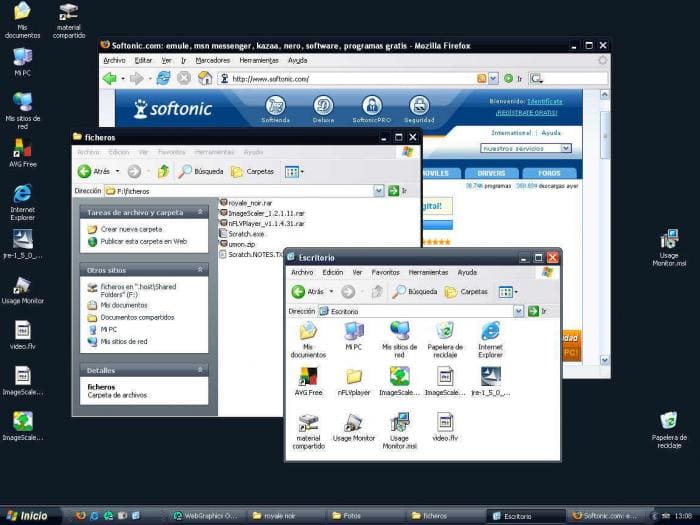
The zune theme is great, now on my XP machines i use a mod of the MCE theme called Royale Noir which is my absolute favorite.
https://images.sftcdn.net/images/t_optimized,f_auto/p/5c889a...
fellowniusmonk 12 hours ago
I agree with you generally but I don't think desktop UI is remotely close to perfected. Unless you mean the desktop as a skeumorphic concept than maybe.
I think we've actually completely stagnate on the human interaction side of OSes and only emacs has made any progress and then only for those willing to put the work in, not as a vanilla user ui.
Grosvenor 12 hours ago
The Desktop GUI was perfected with NeXTStep in 1990. Though some might say Smalltalk in 1984 (modulo some nice artwork and colours).
We could even have unified desktop.mobile codebases, with different GUI layouts. 280 North's objective-J/Cappuccino proved this.
IDK what we're even doing anymore.
NetMageSCW 11 hours ago
The early Mac made huge functional improvements over the Smalltalk GUI, improvements still used today.
majorchord 6 hours ago
> IDK what we're even doing anymore.
I would say people are just disagreeing with you that the situation is actually so black and white.
dragontamer 12 hours ago
The Menu + quick access bar was good for developers but terrible for users, at least compared to the ribbon.
Ribbon is absolutely an improvement for users but is more work for the XML layout and learning how to organize it.
I'm rather convinced that Ribbon is still the best way to organize quick actions, show their shortcuts (Alt to see keyboard shortcuts), and also have enough text to describe all the buttons. But it'd be nice if it were easier to make good Ribbons.
Menu was braindead easy, albeit through ancient process of .rc files and whatnot
thesuitonym 12 hours ago
I'm just not sure why it has to be one or the other. Look at NeXTStep. They had a menu bar (or I guess a menu panel) and a ribbon, although that term didn't exist yet, and it was definitely not 100% there yet.
max51 10 hours ago
I think it's the other way around. Well organised menus can help users discover what functions are available at quick glance without having to hover each icons with the mouse to know what they do. For power users, the ribbons mean you can click directly on the function you need without having to click through menus and sub-menus.
dragontamer 8 hours ago
Menus from Win95 are uniform. All buttons took up one row and a full width of the submenu. (Even if you don't have a shortcut key assigned, the space is taken up and wasted)
It's well acknowledged that modern designers and users benefit from large vs small, and other varying styles of organization.
Menus only had top menus vs submenu vs sub-sub-menu (and so forth). Yes a good menu is useful but...
A ribbon offers many more tradeoffs. It's harder to design a good ribbon, but the best ribbons are always better than even the best menu. The important features will be physically larger with more text and space. The less important or niche features might just be an icon with tooltip, possibly hidden behind a subcategory of the ribbon.
In theory, you can use the modern Ribbon to make old school menus. But why bother? If you made the switch to that XML design language, you might as well take all the benefits of the Ribbon
Or hell, if you like old school menus, you can still make them today. Those .RC editors still work in modern Windows 11. But give it a shot and you'll see how restrictive and bulky old school menus are in practice.
eviks 5 hours ago
The alternative to ribbon is not menu+ quick access, it was easily customizable toolbars where you can simply drag and drop only the buttons you need in the toolbars you need at a fraction of screen space that the ribbon wastes. And no user is ever exposed to that XML garbage only a dev could love
samplatt 4 hours ago
Menubars/toolbars were not n00b-friendly but great for anyone that used a computer for technical reasons.
Old Photoshop, any CAD software, Excel. Smaller buttons and more of them is a steeper learning curve but results in far superior day-to-day usability. You can still hold down [Alt] and see hotkeys, that wasn't unique to the Ribbon UI.
it's all very much an example of the "Look at what they need to mimic a fraction of our power" meme.
latexr 12 hours ago
> The desktop UI was perfected around the time of Windows 95
There’s no need to be hyperbolic or blinded by nostalgia. Yes, user interfaces have suffered several setbacks in the years since, but even if we concede every change was for the worse (they weren’t) it was by no means “perfected” and there was still plenty of area for improvement.
pavlov 11 hours ago
Windows 95 was the last release that had serious user testing in controlled environments. (They were also cribbing lots of notes from NeXT, which helped.)
Something fundamentally switched around 1998-2002 in how interface design was viewed and approached. I started my career in software as a design summer intern at a company that made a Windows “groupware” application in 1997. They took pride in following the platform’s guidelines and actually testing their designs with real users being videotaped trying to use it. The company’s UI design department was tiny, but employed both an industrial designer and a cognitive scientist.
Five years later, everybody I met in UI design was a graphic designer who was drawing glossy website mockups in Photoshop. The elder lore of science-based UI design was completely lost when Web 2.0 happened and app designs became vibes-based. Even Apple couldn’t resist the tide. (Indeed Steve Jobs’s return to Apple in 1997 was a major contributor because he had developed a taste for user-hostile skeuomorphism like the brushed metal QuickTime Player.)
someguyiguess 11 hours ago
Skeumorphism is the opposite of user hostile. Flat design. Now THAT is user hostile.
xp84 10 hours ago
You’re not wrong that they aren’t directly correlated. I can see the argument though that making Notes look exactly like a yellow legal pad was not an automatic gain for usability compared to say, wordpad.exe with its super simple toolbar that showed you every option.
I think a fair take is that going full skeuomorphic may take some options off the table for you because they would conflict too much with the metaphor you’re leaning hard into.
I’m still 100% Team Forstall though, considering the massive violence that ios7 and its copycats have wrought on usability.
SAI_Peregrinus 9 hours ago
Some skeuomorphism is user-friendly, like buttons that animate like they're clicked when pressed down. Other skeuomorphism was user-hostile, like the various mouse-only interfaces where everything had to be dragged around to work.
kalleboo 7 hours ago
Skeumorphism where "things look like real things" can be fine. Complete skeumorphism where "things act like real things" is user hostile.
The poster boy for that is the old QuickTime Player, which had a volume wheel and a drawer for shortcuts. https://www.johnforde.com/teaching/shame/qtime.htm
CSMastermind 7 hours ago
I don't think that's true.
I was at Microsoft when they user-tested Windows 7 to death. Including installing eye tracking software during sessions so you could monitor where the user was looking at on the screen.
That data was in part used to justify the changes made in 8: "Users only click on the start menu 0.1% of the time and when they do they focus on a narrow portion of the screen."
com2kid 3 hours ago
A couple of the UX people who worked on Win8 told me that some of the UX study results were faked to give the desired results that justified the new Win8 design changes.
Def the sort of stories you hear at at a bar after work.
sznio 15 minutes ago
how do you go from
> the users don't focus on this menu much
to
> therefore we need to make this menu as large as possible
shouldn't the conclusion have been "the start menu is so great the user doesn't even need to focus on using it". it feels like desperately trying to make the data fit the predefined conclusion, despite the data screaming and kicking.
anjel 11 hours ago
The war on scroll bars has gotten pretty senseless.
bromuro 10 hours ago
Always-on-screen scrollbars were useless. Now they appear only when needed.
firesteelrain 9 hours ago
I restored them and made them fat again in FireFox. It was getting too thin and hard to find
exmadscientist 9 hours ago
Scroll bars have always been both control (press here to move around) and indicator (how much of this document is there, and how far through it am I?).
Always-on-screen scrollbars are only useless if you think that indication is useless. Many people find it quite valuable.
eviks 5 hours ago
Correct, but you don't need the full thick scrollbar for the indicator function, some apps use a much smaller dot/guide
ThatMedicIsASpy 9 hours ago
They are handy on a tablet. At the same time they are not since dynamic content might be loaded so the true size of the page is not shown to me by the scroll bar.
bombcar 9 hours ago
I hate when magically appearing scrollbars cause the screen to redraw - I especially hate it when the content needs a scrollbar if NOT present, so it appears, which makes the content reflow so it doesn't need it, and it keeps swapping back and forth.
Good times.
publlus_enigma 8 hours ago
There has been a bug in Apple's Quicklook on macOS for as long as I can remember, where the right side of a document is slightly cropped when Always Show Scrollbars is enabled. It appears to expect that the scroll bars should only appear intermittently and renders over the content.
Very frustrating when one is scanning documents and photos, and verifying them through Finder shows phantom cropping.
I personally like the scroll bars to always be visible as they serve as both an indicator and a control.
kevin_thibedeau 8 hours ago
It's really annoying that you need to click on something that the scrollbar covers up or steals focus from.
bombcar 7 hours ago
Schrödinger's button - you go to click it, a scroll bar appears, the button moves. You go to the new button location, the scroll bar disappears, the button returns.
samplatt 7 hours ago
And fuck anyone that likes fullscreen programs and uses multiple monitors.
eviks 5 hours ago
No they don't, they appear every time you scroll even if you never use the bar. And flashing of ui elements is in many cases worse than wasting that space permanently.
It's a tragedy decades of UI research/design can't get any of the fundamental design elements right
bc_programming 3 hours ago
I think elements like scrollbars remaining visible serve a useful purpose of their own. I don't just mean scrollbars in this case depicting the location in the scroll, either, but instead offering a fully predictable interface that looks the same and doesn't depend on state. Elements like scrollbars only appearing when needed- expanding when you hover near them, for example, removes some of the predictability of the interface. If you have elements all over a UI that only appear "when needed" it starts to become a bit of a circus show, IMO; ribbons or toolbars or menus that only appear when you press alt or hover near the top of a window; scrollbars that only appear when you either scroll or move the mouse near the scroll elevator area, etc.
It's some of the same push that has removed titlebars from desktop UI. Programs like Chrome spearheaded effectively taking over that area, because it's a "waste of screen space", But it's not, that screen space was used for a predictable, known UI element that used to be fully expected on all desktop UI Window elements. It's sort of like how we have with writing a predictable convention of words on a page to have margins on the left and right. If that followed the way UX has gone we'd have dismissed page margins as "wasted space" and all text would have 0" margins and run all the way to the edges of the page and we'd pat ourselves on the back for "using page real estate" more effectively.
pjmlp 11 hours ago
Working directly with C API in Windows has not been a thing since Vista, as COM took the main role for API delivery.
The Windows SDK samples like Hilo make use of C++ with COM.
HWR_14 10 hours ago
Windows95 still had failures of UI design, and those weren't fixed until XP.
golergka 9 hours ago
As computers, and smartphones got more popular, the audience got larger and the use scenarios got more and more distant from professional use. Dedicated professionals, like software engineers and stock brokers still prefer CLI and Bloomberg terminal even today. Ordinary office workers late 90s and early 00s window-based interfaces (the ones you're talking about). But smartphone users who just want to play their free games and scroll through facebook actually prefer the mobile-first UIs.
If you see this UI transition through the same lense as CLI-GUI one, a lot of things become more clear, in my opinion.
queenkjuul 9 hours ago
95 feels kinda backwards tbh but 98SE/2000 is outrageously modern. A lot of the windows admin tools are unchanged from 2000 apart from the icons. I really think if you could run a modern browser on 2000 it could be a daily driver for most people
sznio 10 minutes ago
i'm planning to vibe-port some modern software I need to Windows XP. I'm done with the web browser, I'll just vibe native software for the sites I want
brailsafe 8 hours ago
So do I, but I don't think I'd blame mobile-first designs, and instead place the blame on Microsoft sucking at making decisions, sucking at design, and sucking at mobile. Every bad Windows UI has, imo, been the result of trying to be cool and likeable by dying their hair a different colour to get some attention and getting ahead of or catching up with Apple who was playing a different game the whole time.
Apple meanwhile has made some notable mistakes, but when they do, it's usually a thorough bad bet that's just missed the mark, but if they do, it's all throughout their OS in every corner. Even with their recent Liquid glass blunder, they're not really putting a veneer that looks like wood over a rotting corpse of a house, they're just picking bad materials to update an otherwise decent layout. Microsoft's whole track consumer UI/product record imo is trying and failing to bet small but intrusively on ideas that don't work, aren't cool, and have no longevity. You see it as soon as you open the control panel that still looks like the 90s; it's this uncomfortable amalgam of failed tepid temporary marketing pitches by some department that make no sense
tonymet 8 hours ago
i agree. i love the 120hz responsiveness of the UI. how fast the app loads, the buttons click. No lazy loading , placeholders, layout re-renders. Open the task manager: half a meg ram used.
Insanely great performance.
eviks 6 hours ago
How can it be related to perfection to permanently waste a strip of space you rarely (and in some apps never) use?
mrheosuper 4 hours ago
Wasn't that Windows 8 ?
Cthulhu_ 17 minutes ago
This is the part I don't really understand - was the development experience and iteration speed really that much faster moving away from low level languages / APIs? It's in the critical path, it should be stupid fast.
I have some hope that thanks to hardware shortages and AI helping people write software they will rewrite some things back to faster languages. But this is all gut feeling, gut feeling that a lot of modern-day developers are afraid of optimized code.
(I fully acknowledge the hypocrisy, given my bread and butter is JS/TS front-end and I don't like C. But in my defense, there's no market demand for native developers either, barely any Go even, even though a few years ago it looked like a lot of Java backends were getting rewritten)
mattbee 11 hours ago
I just resurrected a 90s kids CD-ROM game that shipped for Windows 3.1 - https://github.com/matthewbloch/orlys-draw-a-story-fixes
The finished patch DLL ended up being a tour of the stuff that broke.
The game did launch on Windows 11 but the main issue was that the 8-bit pre-DirectDraw behaviour was broken - for 256 colour screens, Windows 11 resolvesld palette indices only once, but the game relies on being able to change the palette for fades etc. Most of the screeen ended up black, but you could see the animated parts just fine.
So most of fix ended up being to hook every draw call and implement a virtual GDI that acted like a graphics card of the day.
There was a 32-bit disc space check that overflowed, a couple of use-after-free crashes and some racey threading calls that can't have been tested on a machine with 2 CPUs.
Backwards compatibility from Microsoft was almost all there, and probably would have kept Orly running for a couple of subsequent Windows releases. But it relies on a developer meeting them half-way, it's not an emulation layer.
simoncion 10 hours ago
Your project's readme suggests that you tested on Proton. How poorly does the unmodified game run in Proton and/or Wine when you limit it to a single CPU? Very? Somewhat?
mattbee 8 hours ago
Don't know actually!
But after it was working on Windows, I tried it on Crossover and found that MacOS doesn't allow you to pin to one CPU. So it needed a racey scheduler rewriting.
There was also a difference in the way wine provides printer drivers that caused a buggy code path to run in the game, which caused a crash on the Steam Deck too.
So those bugs would have been critical even if the display implementation had worked.
The patch also adds an OpenGL window & scaling filter as the game's primary output, so it doesn't rely on GDI for pixel output any more.
giancarlostoro 9 hours ago
Makes me wonder if forking Wine to have a "Legacy Windows" compatibility layer... for... modern windows would be worth half a damn.
mattbee 7 hours ago
wine has more backwards compatibility options than Windows itself, but in this project also triggered some different buggy code paths in the original (see cousin comment).
So this game still needed its bugs fixing to run in a modernised Windows, or it would have been stuck in a hardware emulator running Windows 95.
kidel001 12 hours ago
I like that we are amazed by this. And yet all of my books from 34 years ago open up just fine (without cheating, no book opening emulator required!). I can even open a book on my shelf from 1896 without emulation. Not trying to troll too hard but I do think it is shocking how accustomed we've gotten to zero backwards compatibility in the world of software.
andai 11 hours ago
https://xkcd.com/1909/
It is amazing, though. Wintel is basically a Matryoshka doll (Russian nesting dolls), where each version contains all the previous versions. (Just look at how a PC boots up!)
The dedication to compatibility is commendable, and you don't really see it on the other OS's. On that note, this is one of my favorite articles:
Win32 is the only stable ABI on Linux
https://blog.hiler.eu/win32-the-only-stable-abi/
I think that's very funny. Speaking of which, EasyToon also runs in WINE, of course :)
anthonypasq 11 hours ago
a better example would be whether you could put a train from 1845 on a modern track, or fire a musketball from an M16
Barrin92 11 hours ago
>whether you could put a train from 1845 on a modern track
you can do that, in fact I know that Austria still has a mid 19th century train in regular operation (https://de.wikipedia.org/wiki/SB_alt_23)
if you're looking for commuter trains a lot of early 20th century ones still operate around the world.
jeroenhd 11 hours ago
If you live in a country or region where the gauge didn't change, you can put a 1845 train on a modern track just fine. If the gauge did change, you'll need a train from another country. Standard Gauge was first applied in 1825 after all.
wildzzz 10 hours ago
Many militaries are still buying rifles that chamber a cartridge introduced in 1891 (7.62x54mmR). I'd argue a cartridge initially developed for a long bolt action rifle (Mosin-Nagant) that can now be fired out of a variant of a AK-patten select-fire bull-pup (Vepr) fits the analogy.
ggreer 10 hours ago
I think the oldest cartridge that would still work in a modern firearm would be .22 Short, which is from 1857.[1] It was developed into .22 Long, which was developed into .22 Long Rifle, which new firearms are still chambered in today. It wouldn't cycle a semi-auto though. Another contender would be .38 Long Colt, which is from 1875 and will work in firearms chambered in .38 Special or .357 Magnum.
The main causes of incompatibility were the transition from ball-and-powder to rimfire cartridges, then the transition from rimfire to centerfire. It's surprising how little firearms have changed in the past century. 9mm Parabellum is 125 years old. The Browning short recoil action (used by most handguns today) is over a century old.
Cthulhu_ 6 minutes ago
Why train when you can just walk? (yeah this a snarky remark to the grandparent comment)
eahhn 11 hours ago
I guess this is one of those proverbial “I had to create an account to comment” messages:
eviks 4 hours ago
Give it a few centuries of evolution and maybe we'll get there
stkdump 3 hours ago
I think the point made here is that the application runs as if it were a modern application, even though the OS is completely unrecognizable when compared to the OS it was written for. There are other ways to run old applications on modern hardware with modern OSs, which the author would consider cheating for the purpose of TFA. Heck, I can run ancient DOS and gaming console applications on my phone if I wanted to.
tgtweak 12 hours ago
I'm reminded of this amusing and brilliant post: https://blog.hiler.eu/win32-the-only-stable-abi/
capnjngl 13 hours ago
Speaking of FreeCell, a couple weeks ago I was visiting my 95yr-old grandmother and noticed she still plays oldschool FreeCell, specifically a variant that's really hard to track down now called FreeCell Pro [https://cards.fandom.com/wiki/FreeCell_Pro]
It inspired a weekend project. I always liked that you could swap the card backs in OG FreeCell and play with different "themed" decks, so I vibecoded something a little more modern. I got carried away and added a roguelite mode too (yeah I know how "Roguelite FreeCell" sounds). Anyway, it's free to play on the web, no ads: [https://freecellworlds.com/]
ramses0 12 hours ago
Solitaire's Journey: https://en.wikipedia.org/wiki/Solitaire%27s_Journey
Basically a 1992 rogue-lite where each room is a different solitaire game. eg: front parlor == clock solitaire, first bedroom == regular solitaire, upstairs is blocked by freecell, etc...
Screenshots: https://www.mobygames.com/game/1986/solitaires-journey/scree...
It's a fairly rich concept, you have a ton of different gameplay bound together by a very loose plot/quest mechanisms (eg: blue key == blue door ; boss == win 2 games of solitaire).
Definitely worth sharing if you've got some solitaire fans in your life!
capnjngl 11 hours ago
Wow this is amazing! I love this bit from the Wikipedia article:
"In 1996, Computer Gaming World declared Solitaire's Journey the 72nd-best computer game ever released."
The bar has moved up a tad I think :D
bibstha 11 hours ago
Is there a but or maybe I don't know the rules. Sometimes I can't put a long sequence J 10 9 8 7 ... on a Q
capnjngl 11 hours ago
Yeah classic FreeCell only lets you move one card at a time. No stacks. A lot of FreeCell implementations have a QoL feature that let you move stacks if there's enough free cells or empty columns to allow the move.
bibstha 4 hours ago
Ah I see, I get it now.
dofm 13 hours ago
> At the time of this post, that’s a 33 years and 8 months old application,
Pointing this out without a trigger warning is just rude ;-)
Some of us are older than we think, yo.
suzzer99 12 hours ago
I helped develop a web app used by major drug companies in 2001 that's still in use as far as I can tell. Marvel at the Dreamweaver-enabled design: https://resultview.q2labsolutions.com/resultview/logon/logon...
dofm 11 hours ago
:-) Nice.
The oldest web app code of my own that I still maintain/evolve turned 20 this year, so yours is older than mine. I think it's largely a Ship of Theseus at this point, though I did just remove some code the other day that was absolutely untouched since 2008.
xnx 11 hours ago
Along these lines, I'm always amused with the videos (e.g. https://www.youtube.com/watch?v=C8CIhCTVyqQ) showing you can update a [virtual] device from Windows 3.1 to Windows 11.
lolpanda 13 hours ago
In 2026 does it still make sense to build new Windows app using Win32 API? I was building a simple image viewer similar to QuickLook on Mac using Win32. I found it's very responsive. The code is less readable compared to React. For me Win32 is a good option if the UI state machine is simple enough.
jim180 13 hours ago
I am having a blast with AI + C + WinAPI. The responsiveness of WinAPI is awesome
the__alchemist 13 hours ago
I wouldn't, because I do not think we should put up barriers in our application between OSs (Nor have to maintain separate UI code bases for each OS you think might use it). So I use cross-platform kits. There are compromises, but I don't care about the looks native qualification compared to works anywhere. Yes, the software looks like an EGUI app (etc. Substitute Qt), instead of Looks native, but I appreciate how I'm not setting up barriers between OSs or making extra work.
jen20 13 hours ago
I also don't care how if things _look_ native, I care if the work like a native app. For example, on the rare occasions I touch Windows, I expect standard keyboard shortcuts to work. On macOS, I expect full integration with the accessibility frameworks and OS affordances like services.
A lowest common denominator idea of "everywhere" is just not that useful.
the__alchemist 10 hours ago
How do you handle this for your own software? Could you please link me to one of your project's websites and install instructions? What specifically do you find that one OS has that's mandatory for a good/native UIs that others don't?
I hear you on the native UI is better all things considered. I'm trying to figure out how that works in practice. I.e., to accompany a "cross-platform UIs are inferior to native ones", you would be effective to also include the workflows you use. In a realm where you choose options, eliminating one should come with illuminating another, as one must choose a path, and others could be eliminated for their drawbacks as well, leaving none available. What is your path here?
jen20 7 hours ago
No - almost all of the software I work on is at least one of:
- proprietary,
- command line tooling,
- single-platform.
A good example of what I consider to be a great approach (not mine) is Ghostty, which has fully native UI per platform and a shared core between platforms. JetBrains tools also go out of their way to integrate with platform conventions everywhere.
An example that cross-platform toolkits usually get wrong: cursor navigation in text fields. Home and End do different things on different platforms, and on macOS, basic emacs/readline bindings are supposed to work in all text entry fields.
It’s worth noting that this extends beyond GUIs - command line tools written in Go tend to use “package flag” which is native nowhere. The standards between Windows (which has two, in cmd and powershell), GNU-style and “legacy” Unix style are just not reconcilable without implementing platform-specific behaviour.
floydnoel 12 hours ago
I couldn’t disagree more, when it comes to UIs. They should match the platform they are being used on. Cross-platform always produces a very sub-par experience. But us developers tend to care primarily about what makes development easiest for us.
the__alchemist 12 hours ago
What does this mean in practice for software you write? What OSes to you build it for, and what OS or GUI-specific conventions to you follow which don't apply to others?
edit: Link software you wrote's installation instructions.
floydnoel 6 hours ago
You can just look at my profile and see some of it, or check out my website. I’ll have a new app to show soon, so stay tuned!
Rohansi 11 hours ago
Not everyone has the resources to build five or six different UIs.
floydnoel 6 hours ago
I think it’s better to do a good job once rather than five or six bad jobs, but we all have different priorities.
Rohansi 5 hours ago
The way you worded this message could mean either a) people should focus on a single platform using native frameworks, or b) people should use a cross-platform framework instead of spreading themselves too thin. Maybe even both?
Doohickey-d 12 hours ago
These days, with LLM assisted development, with relatively simple GUIs, I would go towards platform native GUIs per platform. And then all the shared business logic goes in a shared "core", with the GUIs only serving as "dumb" inputs and outputs, with all business logic shared between them.
LLMs are quite good at tedious tasks such as keeping multiple GUIs in different languages in sync with each other.
Rohansi 10 hours ago
You still need to test all of those separate GUIs though so it's still costing more.
You also generally don't want them to actually be in sync because there are actual UX differences between platforms that you need to align with to really be native. If you don't follow that then what's the point?
NetMageSCW 11 hours ago
So instead you are creating a bad UI for all of your users. That’s very Java application (or perhaps Electron these days) of you, but seems like a poor trade-off to me.
the__alchemist 10 hours ago
Could you please clarify why you think cross-platform means bad UI?
toast0 12 hours ago
I mean, if I was building a windows app, I would. Microsoft always tries to convince people to stop using it, but Win32 keeps working.
If Microsoft ever makes something that actually meets all the needs that Win32 addresses, they'll probably build a compat layer and a) your win32 code will still work in compat mode, b) that new thing may be worth targeting.
chuckadams 12 hours ago
Unless your name is Raymond Chen, you probably want to at least use ATL/MFC, which are frozen but still supported. Me, I'd take Qt any day, or wxWidgets if I wanted to go minimal.
okanat 12 hours ago
I think the sweet spot is WPF or actaully its FOSS version: AvaloniaUI. It is high level enough to be cross-platform and not stupidly verbose, however it is rather light pn resources. However, Win32 still wins in absolute minimalism.
adzm 12 hours ago
Win32 API is great and responsive; ATL/WTL (and MFC) are still very useful abstractions with little cost. The biggest pain point is having to handle a lot of things manually, like DPI awareness (and themed controls). Even things like Emoji and other modern text features are not available through GDI and require DirectWrite iirc. Still, I'm surprised how useful it manages to be regardless how old it is.
queenkjuul 8 hours ago
When you say responsive, you mean like it reacts quickly, or it responds to screen size?
In web we refer to the latter but i feel you mean the former.
I built a toy project in .NET 2005[0] with WinForms and the experience was actually excellent, binding data to controls was dead simple, it felt surprisingly modern. But i can't imagine how I'd make the UI resizable lol
canucker2016 6 hours ago
Probably more responsive.
Windows apps always had to be able to respond to dynamically changing screen dimensions since the user could change from one screen resolution to another while an app was still running. Apps would get a WM_DISPLAYCHANGE message in their top-level windows message processing loop. Docs say WM_DISPLAYCHANGE was introduced in Win95.
keithnz 11 hours ago
yeah, it's still pretty good for a lot of things. I've found with AI it's now super easy to do native win32 apps really easily. It used to be doing all the plumbing was a PITA. There were wrappers to make it easier, but now you can do it directly. It means you get super performant, tiny binaries, that start instantly. Like windows should be. However, at home I've moved to linux a while back so way less useful to me now, though works fine with WINE. I still use it to make little utilities for work though.
NetMageSCW 11 hours ago
I would say WinForms in C# is still the best today.
Scharkenberg 10 hours ago
While Win32 tends to deliver the most resource-efficient and responsive apps if the complexity is not high, I have settled on the latest .NET + C# + Windows App SDK / WinUI 3. Making an app look good and fit into the modern Windows look is extremely hard with Win32 C/C++ and writing and maintaining it requires energy that I'd rather spend elsewhere. Besides, modern frameworks are making great strides in speed, efficiency and QoL features. .NET 11 is full of optimizations, for example.
lloydatkinson 10 hours ago
I've tried this and found the WinUI deployment model frustrating and user hostile. There are like 5 open issues on GitHub where people seem deeply confused (I'm one of them) as to if it's possible to build a plain .NET .exe. Some people have tried it and it "works", others try it and get obscure errors, it's a real mess.
ack_complete 3 hours ago
As someone who does raw Win32 API based UI... no. The Win32 UI system has been neglected for many years and is missing very basic functionality by modern standards, including dark mode support, antialiased rendering, hardware accelerated image stretching, and wide color gamut / HDR support. You're going to be working around a lot of ancient restrictions compared to a more modern UI and rendering layers on top of it.
mijowi 14 hours ago
I often think old GUIs have a nice, functional look to them. This one is no exception. I notice (what I assume is) the shuffle toggle looks unfamiliar. This is from way back before that UI became a convention! I see the repeat icon has stuck around. So interesting!
elxr 13 hours ago
Functionality isn't hidden and buttons looked like buttons (instead of the modern trend of having unstyled text or tiny icons having a 50-50 chance of being a button).
dawnerd 13 hours ago
The flat design trend really confused me. It really took off when high resolution screens started getting popular too, really made no sense. Wish we'd bring back Skeuomorphic design. Bring back that wood grain and metal textures. Bring back the fun UI's and app themes. Bring back real buttons!
weinzierl 13 hours ago
Microsoft (and Apple) poured a ton of money into usability research in the early 90s and it showed. I vaguely remember the story through how many versions of the trash icon Microsoft went for Windows 95 to get it right.
For me it was a bit sad to see the mad and creative UX world of the homecomputer era being bulldozed over with the minimalist uniform results of the scientific usability research.
Little did I know that a mere quarter century later we are back were we once started and everyone as clueless as we were in the 90s goes overboard everywhere as if there was no tomorrow.
Yeah, and it sadly makes me miss the nicely ordered and easily usable world - I'm gettin' old I guess.
bluedino 13 hours ago
There are a couple versions of the Windows CD player here (along with other operating systems)
https://guidebookgallery.org/screenshots/cdplayer/
I always liked the look of the more complicated ones like this:
https://ctrl-alt-rees.com/2021-09-29-media-rack-download-win...
sedatk 10 hours ago
I remember having installed Win32s package to our Windows for Workgroups 3.11 machines at Osmangazi University in 1995. The idea was that Windows, as a 16-bit operating system, could run a subset of Win32 apps that were compatible with the Win32s API surface. However, the release of Windows 95 had almost immediately made it obsolete. I'm sure it was useful in certain scenarios, but our only win was Freecell. :)
toast0 8 hours ago
> The idea was that Windows, as a 16-bit operating system, could run a subset of Win32 apps that were compatible with the Win32s API surface.
386 mode in Windows 2 (sold as Windows/386) and 3 was really a 32-bit operating system for 16-bit applications.
Win32s allowed some 32-bit apps to run on windows 3.1 and up. Including many versions of Internet Explorer (Microsoft also released ie as a 16-bit application, though).
Mogzol 9 hours ago
> That is because, duh, my computer doesn’t have a CD-ROM drive. But you can use a small DLL (cdemu.dll) to emulate one with some fake audio data and actually get it to play audio
This makes me curious to know if CDPLAYER.EXE would still work (unmodified, without extra DLLs) with a real CD-ROM drive if you ran it on a Windows 11 machine with one installed.
queenkjuul 8 hours ago
I can't say for certain but recently having done some work on windows with CDROM drives, i strongly suspect it would. I bet you could mount a music CD BIN/CUE with ImgDrive and it would work... Shit i guess i have to go try it don't I
Edit: i meant ImgDrive as a suggestion for those without optical drives. I have several, I'll test em out
unleaded 7 hours ago
Tried it. If I open it with a disc in, it shows the "No CDROM devices found" message. If I open it without a disc in, it shows the menu, then when I put in a disc in Windows shows a weird error: https://files.catbox.moe/6y3qpy.png
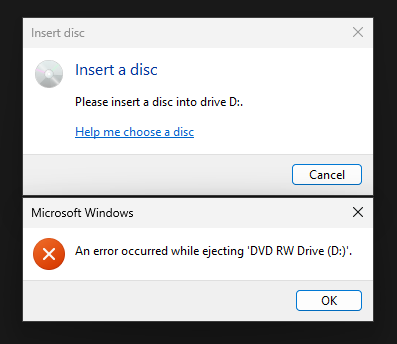
It acts generally weird (buy a £10 dvd drive from ebay and try it yourself if you want any more detail, useful thing to have anyway) and obviously I can't get it to play anything.
The RTM version gets a bit further, doesn't show that weird Explorer error, but I still can't get it to play anything and opening the playlist crashes it vs on the Beta version where it actually listed the tracks.
I suspect the cd player is trying to take control of the drive and fighting with Windows trying to be helpful, don't know if there's a way to turn it off.
tgma 8 hours ago
"Can you believe it... Reversi" reminded me of the Steve Ballmer ad for Windows 1.0: https://www.youtube.com/watch?v=DgJS2tQPGKQ
andai 11 hours ago
EasyToon (from 1998, I believe, built for Windows 95) runs on Windows 11. One of my favorite pieces of software.
It's a thing for making little black and white animations. (With GIF export.)
It was popular in the early 2000s and there was a subculture around it on animation forums.
English version (hey, still online!):
https://www.superfundungeonrun.com/easytoon/
Original version (Japanese, w/ screenshots):
https://web.archive.org/web/20020111185602/http://www.radium...
There's also a forked version on a French website (also available in English) with some extra features. But I like to keep it simple :)
Aldipower 14 hours ago
vondur 9 hours ago
Microsoft is known for making Windows run older programs. Apple not so much.
kevin_thibedeau 8 hours ago
You don't even have to find old binaries. The ODBC manager is still shipped with Win11 and has Win3.0 / NT3.5 dialogs with 16-color icons.
xacky 13 hours ago
There's probably an old X11 app from the 1980s that could be executed through xwayland somewhere.
layer8 13 hours ago
As an unmodified binary from the 1980s on current Linux/Unix? Highly unlikely.
ndiddy 13 hours ago
From the article, the time to beat is November 16, 1992. This might be possible on one of the BSDs, as FreeBSD and NetBSD both document support for running a.out executables with the 4.3BSD ABI. I guess it would depend on whether anyone had ported X11 to run on a BSD on i386 before then. Alternatively, maybe you'd be able to get something running on SCO OpenServer (if you count that as a current OS, it IS still getting security patches). It documents support for XENIX x.out binaries ( https://www.scosales.com/ta/kb/126704.html ) so you might be able to run software compiled in the late 1980s for XENIX/386.
spijdar 12 hours ago
NetBSD has excellent binary compatible with 80s "unix", the problem is most (all?) of the 80s unix platforms it supports aren't x86.
Current NetBSD still has good support for running SunOS binaries, though, including graphical ones. I'm certain you could get a SunOS 4.x binary from pre-1992 to run on NetBSD/SPARC. I've no idea how far back you could potentially go on NetBSD/m68k -- probably quite a ways, especially if the binaries are statically linked. SunOS pre-1988 was all static linking!
(Running "real" 4.3BSD binaries might be hard -- I think NetBSD/VAX defaults to ULTRIX compat, which is an either/or thing versus strict Berkeley Unix compatibility. Same binary format, similar but incompatible syscalls/data structures.)
jpablo 13 hours ago
I can't even run a binary from one Linux distro to the other, let alone one from a random Unix from the 80s. If a rebuild from source is allowed (which would need to allow modifications to the build system) that's a completely different game.
xattt 13 hours ago
> I can't even run a binary from one Linux distro to the other
the__alchemist 13 hours ago
It depends. I've found for example, if i compile on Ubuntu or Debian, it will probably work on any Ubuntu, Debian, or Debian-based distro released at or newer than the one I compiled it on. There are other cross-compatible examples.
More broadly, there are things like manylinux and MUSL which allow cross-distro applications.
martijnvds 12 hours ago
Containers fix this.
As long as the container bundles the right libc, the program should work.
the__alchemist 12 hours ago
I agree - the model I use for why containers (Docker etc) exist is to abstract over Linux ABI incompatibility. I don't think they're a great solution, as it complicates software distribution. I should be able to distribute an executable and have it just work.
toast0 8 hours ago
That's what win32 is for...
the__alchemist 7 hours ago
Hah well yes for Windows. This is a mercy, but my mindset is still "Works on Windows, Linux and Mac". (The last being dropped for anything that requires Cuda...)
toast0 5 hours ago
Win32 is the stable ABI for Linux, too.
Rohansi 3 hours ago
Linux isn't the source of the incompatibility. The kernel itself is very strict about not breaking userspace. Your userspace is breaking compatibility on its own, containers fix it by shipping the userspace components within the container, which only works because the kernel maintained compatibility. If the kernel broke compatibility you would need to use a VM so you can run a different kernel version.
mrheosuper 4 hours ago
Just like Python venv, The system is too broken that it's the only real practical fix
0x0203 13 hours ago
Many programs are dynamically linked to at the very least, libc. If the system libc is older than what the binary was developed for, it will often fail. Failures going the other direction are less common, but can and do still happen. If the binary was statically linked with everything it needs, you've got a pretty good chance it'll work, but that's a bit harder to do with GUI programs that need to interact with X or Wayland.
jeroenhd 11 hours ago
I had to run a Linux binary compiled for Ubuntu 10.something a few years ago. I couldn't get the drivers to work properly in libvirt and getting the binary to run on modern Linux was practically impossible, even with 32 bit support installed.
The downside of dynamically linked binaries: every tool of medium complexity needs a close-enough version of a common library, and once those get upgraded, the tool dies.
Most statically compiled version should work with a compatible enough libc, but I haven't seen many old programs like that.
Wine, on the other hand, runs tools from the 90s just fine, as long as they're 32 bit.
boomlinde 37 minutes ago
AFAIK Wine will run 16-bit applications just fine now, through WoW64.
kragen 8 hours ago
Yesterday I built a binary in an Ubuntu 24.04 Podman container and tried to run it on my Debian Bookworm system:
[filename]: /lib/x86_64-linux-gnu/libm.so.6: version `GLIBC_2.38' not found (required by [filename])
The other way around works fine, though, and you can avoid it by statically linking the binary when you build it.
dekhn 12 hours ago
I've had static binaries on linux machines that worked across distributions for decades.
dvh 13 hours ago
Just used xev today (bought new mouse few days ago and it wasn't responding in chrome so I wanted to be sure).
LeFantome 9 hours ago
xwm from 1984 and twm from 1989 will still execute on Xorg today.
And if you want to run them on Wayland, Worg will do that for you. https://github.com/jmalcolm137/Worg
MisterTea 12 hours ago
> And although using otvdm does feel like cheating, I thought it was cool enough to include in this post.
Honestly, if NTVDM was part of Windows then it seems fair to use it, even 3rd party clones.
enlyth 12 hours ago
Yeah I was kind of on the fence with this, but since the last version of Windows that shipped with NTVDM was Windows 10 32bit, and Windows 11 doesn't have a 32bit edition, I decided that using 3rd party tools would be cheating
I was aiming for something you could double click on vanilla Windows and would just work out of the box
userbinator 13 hours ago
Wrote a few small utilities in Win32 in the early 90s; still use them today unmodified, but most recently in WINE. I have some slightly older DOS utilities that are also quite usable.
Harukadia 8 hours ago
Very nostalgic. I think UI today is too simplied, but I can't stop making kind of that, because many user are not a member of Hacker News.
sammy2255 12 hours ago
If you tried this on Linux desktops you wouldn't get far
hualapais 6 hours ago
Here I was thinking it would have been Kedit…
t1234s 11 hours ago
Does visual studio still package the Spy++ exe that looks like its from the early 90's