

1. Democracy is about access; make sure everyone has access to your software. 2. The keyboard allows folks with disabilities and power users to fly through your website/app… that being said… the second a tab is off, the person with a disability flies into a wall.
GUIs should be fully keyboard-driven (ckardaris.com)
687 pointsby ckardaris14 hours ago335 comments
rootedbox 10 hours ago
I work on ADA a lot for my company. Please put on some headphones, turn on the voice assistant of your OS, put on some blinders, and run your app or website… no mouse, just keyboard.
ckardaris 9 hours ago
That's a good point. Accessibility is the next step that should also not be ignored. Navigating to the elements is one thing, but for the voice assistant to work properly it can be a little trickier.
thefunnyman 9 hours ago
Yeah unfortunately this seems to be something very few outside of bug tech dedicate resources to. Even for them it seems to be an afterthought, at least in my professional experience. It winds up another compliance checkbox just like security.
CamperBob2 9 hours ago
What do you mean by "a tab is off?"
IshKebab 9 hours ago
Normally you press tab to move between widgets. I guess he means if the tab order hasn't been set up properly.
theeyescanner 9 hours ago
It's been a while since I've done actual development, but determining tabindex ordering was a very big deal in the early 2000s when clerks/admins were moving from legacy systems to the web. They did most of their jobs with a keyboard, and if you set up tabindexing so that they can use a keyboard for 90% of their job then they would fly through tasks. If you didn't then you'd have some very angry clients at the end of the project ;)
So just echoing that this is not just an accessibility thing, but just a good user interface design thing. If your UX designer isn't taking keyboards into account (jettison mobile first development into the sun please) then they have no business building business applications.
nottorp 8 hours ago
I worked on an accounting application once. We had the proper tab order written down on paper docs and checked/updated it regularly.
We would have been murdered by at least the point of sale people otherwise :)
Sarkie 7 hours ago
I worked in hotel industry, same deal.
Power users would complain within hours
mikepurvis 9 hours ago
Using tab to cycle between interactive elements in a window or page. As soon as you tab and it goes somewhere unexpected, you're cooked.
gramie 9 hours ago
I had to keep accessibility in mind a lot in my previous job (web development for a university). The thing that I consistently found was that, the more accessible a website was, the better the experience for everyone, not just people with disabilities.
phatskat 8 hours ago
I 100% agree. I've been working on a component library rebuild at work and accessibility is a key focus, granted I don't think that would be the case if some of our contracts didn't mandate it but it's fiiiiiine
I'm someone who enjoys this kind of work, especially when the target is a stylized drop down - I got to spend a week with the MDN page for the ARIA combobox open, trudging through all of the ins and outs of keyboard accessibility and I know I'm still missing a couple things (typing when the control is focused but not open, for example), and having clearly defined specs is something we don't seem to get a lot in webdev
PunchyHamster 7 hours ago
that's generally the case with many accessibility features, not just for websites
keerthiko 7 hours ago
yep, the curb cut effect is a well-researched and documented phenomenon [0] across ADA development in all aspects of the world.
accessibility work isn't just about making things possible for folks with disabilities, it's about making things better for everyone.
TomatoCo 5 hours ago
Another way to think of this is that everybody occasionally needs to do something unusual. But some people, due to their life circumstances, always need to do something unusual. And making things better for the always-odd folk is also a positive to the occasionally-odd folk.
Which like, we're all eventually gonna be odd folk! That's what age does to us. But we should understand these accommodations as being a net positive, not a cost, to society.
gregdeon 2 hours ago
Yep. In accessibility research, they call these "situational disabilities". When you need to open a door with your arms full of groceries, you aren't so different from someone who is never able to open a door. Accommodations that help people with permanent disabilities also help other people in the right situations, too.
jaggederest 7 hours ago
Some of the things we take for granted in UI/UX originated that way, like automatic hamburger menu hide/show (for very large zoom) and "scroll to content/top" buttons for screenreaders, which, if you've ever tried to read a recipe online are pretty critical. Captions on videos are also like that, although there you might share blame to them for enabling the poor sound mastering on things like, legendarily, Tenet, perhaps.
Velocifyer 5 hours ago
What are the advantage of “scroll to content/top” buttons over <main> for screen readers? I think that the use of those buttons is for when the CSS fails to load.
jaggederest 4 hours ago
It's essentially the same thing, but a lot of the time people will add a sr-only button at the very top that just goes straight there, and one at the bottom if the screen reader gets stuck in the footer nav, as well. Depending on which screenreader people use they sometimes only work on the actual hydrated markup, so <main> isn't always visible the way you'd expect. It's been a while since I did a11y tho so I'm probably hopelessly out of date.
madeofpalk 5 hours ago
That's because at the end of the day:
- accessibility is just usability. all it is is making sure your product is as usable by as many people as possible.
- it's a myth that "people with disabilities" are some other that excludes you, and 'accessibility' or assistive technologies only benefits other people. Everyone is only temporarily 'abled'. You need to use prescription glasses to comfortable read a computer screen? You're a parent trying to watch some TV while getting your child to sleep? All benefit from assistive technologies.
Xirdus 39 minutes ago
> accessibility is just usability. all it is is making sure your product is as usable by as many people as possible.
Not always. There are things that increase usability for fully abled people but decrease it for disabled people. Color-coding is a common one. Another is using smaller font size to make more info visible at once, or advanced touch gestures that can be accidentally triggered by shaky hands.
Then there are accessibility features that actively harm fully abled users, like sticky keys or screen readers that automatically follow focused UI elements.
algoth1 9 hours ago
My father is blind, the only tech he knows how to use is a smart tv, when i build him custom apps the first thing i do is turn off talkback when the app opens, so i can control what tts says. The regular talkback is so so annoying and repetitive
cute_boi 9 hours ago
The issue with accessibility is bots from scrapefly or browserbase will abuse website to death. There is reason why we can't have good things due to abuser like scrapefly, browser base, anchor browser etc... I had to turn off all the accessible selector and randomized html soup to make their life harder.
novok 9 hours ago
The solution is redirecting to an actual API or MCP with the same ability as your GUI, along with a real way to export your data. This is the future with how AI agents will work whether you like it or not. People are not going to want to deal with a GUI if an agent can do it better and faster for them.
goosejuice 8 hours ago
Definitely not a substitute, and a bit slow, but GPT computer use is demonstrating an alternative path with live vision models. I'd be curious how this is fairing for those with vision impairments.
stillpointlab 8 hours ago
I believe AI can be huge here. Things like ADA are often mechanical (adding the correct attributes to the most important page elements). It is the perfect work to audit and fix using agents.
It is a business opportunity as well. I worked at a company that paid for an audit before LLMs. There is tremendous cost savings possible here.
I also wonder if WebMCP will be the ultimate final incarnation of this.
z3c0 8 hours ago
Using AI to close gaps in accessibility is like adding treads to your vehicle because society is too lazy to pave roads.
MrJohz 7 hours ago
I think they were suggesting using AI to audit for accessibility, which is probably a better approach, and probably more effective than a lot of the basic accessibility checkers out there that work on a list of fairly simple rules and don't understand the context of what they're doing, so tend to give either very limited advice, or sometimes even offer bad advice.
z3c0 7 hours ago
Research and fallbacks would certainly be better. An 85% design, 15% algorithmic solution is probably the sweet "pobody's nerfect" spot, but a company using AI to solve accessibility is like selling rape whistles -- in a perfect world, your market is nonexistent.
stillpointlab 7 hours ago
I think people outside of enterprise have no idea the cost to audit and fix a massive website.
The law is a forcing function here. Lawsuits can and do happen when sites of a certain size fail to implement government-mandated laws. This is a good thing, IMO, but it only comes into force in the largest cases.
If there is a credible path to 1/10th the cost (while still providing liability insurance which is a critical piece) then that will likely encourage more enterprise to do it proactively, and will open the door for startups and mid-sized companies.
I have no idea why anyone would choose to see this as bad.
z3c0 6 hours ago
I'm not outside of enterprise and have worked hands-on for over a decade with AI-driven customer workflows. The cost of accessibility audits are NOT higher than AI R&D or third-party B2B contracts for vaporware touting to do the same.
Sorry if that assertion stands opposed to your value prop.
stillpointlab 6 hours ago
The state of affairs in the last 6 months bears almost no resemblance to the state of affairs in the last decade.
No need to apologize, neither of us can predict the future. I am optimistic Fable-level models can succeed where the old not-actually-AI models failed. No shame in being pessimistic about the same.
nonethewiser 4 hours ago
Well isn’t it like asking the AI to pave roads?
MrVandemar 6 hours ago
> It is a business opportunity as well. I worked at a company that paid for an audit before LLMs. There is tremendous cost savings possible here.
Do you know one of the most underemployed groups are disabled people? And do you know where a number of disabled people get employment? Disability audits (unsurprisingly they're extremely good at this).
Congratulations on recommending further marginalising an extremely marginalised group.
stillpointlab 6 hours ago
I suppose it is a question of balance between: the entire web being better for all those that require accessibility vs. a subsection of that community holding their jobs. And it raises the possibility that the increased accessibility could lead to more job opportunities.
But I'm not really a consequentialist and think of things in virtue ethics terms. And using technology to scale benefits to a wider group of people doesn't conflict for me. YMMV.
nonethewiser 4 hours ago
Wait what? We should withhold accessibility features to not marginalize disabled people?
gopher_space 29 minutes ago
The companies who think AI means they get to reduce headcount will be eaten.
netbioserror 8 hours ago
Why not have WMs and DEs specialized for specific disability categories?
shakna 8 hours ago
Both your window manager, and desktop env, already have a gigantic tree of accessibility systems built into it.
... And then your app turns into a canvas made in Electron.
Sarkie 8 hours ago
I used to do loads of accessibility testing with my sites.
I was fired because I did too much once
robomartin 7 hours ago
> Democracy is about access
No, not really. I know what you are trying to say, and I fully agree. We need to stop using "democracy" or "democratizing".
Democracy, in it's purest form, is about mob rule --majority rule, if you want to say it in a softer/kinder way. "Democratizing" means giving a mob control of the thing, it does not mean making it accessible to all at all.
iLemming 7 hours ago
Democracy is not about mob rule, it's about a dialog. Sure, sometimes it becomes heated argumentation and noise, but it's not so much about "ruling". Lincoln in his union address in 1860 said: "I so adopt it because it furnishes a precise and an agreed starting point for a discussion between Republicans and that wing of the Democracy headed by Senator Douglas."
"Democratization" in a sense is about making things accessible for discussions. "Dictatorship" is the opposing term - things get "dictated" by a single entity - person, political force or a corporation.
robomartin 6 hours ago
> Democracy is not about mob rule, it's about a dialog.
No my friend, Democracy is majority rule, which easily turns into a ruling mob. It has nothing whatsoever to do with dialog.
Also, your quote of Lincoln's address is taken completely out of context. He was talking about his opposition of the ideas of a faction of Democrats who were in favor of slavery and his support of the majority of Republicans who believed slavery was a moral, social, and political evil.
In other words, take the time to at least do some research before you try to use quotes in support of a failed conclusion.
Did you read the Greeks in school? Probably not. I recommend Plato's Republic. Both he and Socrates talked about the flaws of direct/pure democracy that would usually make it degenerate into mob rule.
In Republic Plato developed a hierarchy:
  Aristocracy: Rule by the wise (my comment: a fantasy)
  Timocracy: Rule by the honorable (my comment: another fantasy)
  Oligarchy: Rule by the rich (my comment: a reality in many societies)
  Democracy: Rule by the masses (my comment: glad we don't have this)
  Tyranny: Rule by a despot (my comment: plenty of examples of this in history)
So, "democratizing" means letting the masses have their way. It does not mean making things accessible to everyone, which is the hilariously or tragically ignorant way in which Silicon Valley tries to use the term. You see startups all the time say "we are democratizing <X>". Just how stupid are these people? They are saying we are going to let the mob have access and benefit from <X> not making it available to everyone.
In the context of Plato’s political philosophy the modern, casual use of the word "democratizing" completely ignores the historical and philosophical baggage of the root word democracy.
The irony is that modern society uses "democratize" as an undisputed positive term (meaning liberation and fairness), while the very philosophers who birthed western political thought used "democracy" as a warning label for instability and lawlessness.
A better term for what startups want to say would be "commoditizing": turning a specialized, elite resource into a public good or a widely available commodity; not "democratizing", which is an ignorant use of a term that means almost exactly the opposite.
I guess classical education has not been a part of schooling for quite some time. As a kid I did not necessarily enjoy reading the Great Books. As an adult, I can see how much damage has been caused by the abandonment of such valuable teachings.
rustystump 5 hours ago
Classics are still there, at least they were for me. Then again, i didnt have the pleasure of experiencing American public education.
As much as i do agree, overtime language does eventually change but it can happen over our dead bodies
iLemming 2 hours ago
> language does eventually change
Exactly, words do not carry their root's connotations as a permanent tax. 'idiot' used to mean "a layman, someone not holding office or lacking skill', or "a person not interested in politics"; 'nice' comes from Latin 'nescius', which meant "ignorant"; 'cretin' meant "Christian".
Democracy is not mob rule, and the Greeks agreed. They had a separate word for mob rule: 'ochlocracy'. Having two words means the Greeks did not treat them as identical. Plato and Aristotle argued democracy tends toward it, but they still have not treated it for a definition.
Bringing Plato here is kind of weird: The Republic is an anti-democratic aristocrat's argument, written by a man whose teacher was executed by an Athenian jury. Plato was born into the Athenian elite. His mother's family gave Athens tyrants whose regime killed something like 2000 citizens in less than a year. Plato initially was invited to join, he considered it, and pulled back when he saw what they did. He was part of anti-democratic coup. Citing him here for the word definition, is like citing Marx for the only definition of 'capitalism' - not exactly inaccurate, and might be even exactly correct, yet the context and connotation still matters - Plato took neutral-to-positive word and gave it a hostile reading, while Marx haven't even talked about 'capitalism' (he had "kapitalistische produktionsweise"), the actual term as we know it was popularized later.
'democracy' aside, "make accessible to all" is a long-established dictionary sense of 'democratize', it was never a Silicon Valley invention. And you're right - "representative democracy" only took hold in the late 1700s. The term's meaning moved after Plato. If democracy could shift from Plato's warning label to a thing Hamilton endorsed, 'democratize' could shift too.
I implore you, good sire (@robomartin), to unsaddle your high horse and let the language take its course - if people and times decide to give words different meaning, it most likely will happen anyway.
gblargg 6 hours ago
That was my first thought, that a TUI is still a GUI. Close your eyes and explain how you can use a TUI from the keyboard. The only difference is what the display can render.
tptacek 4 hours ago
Modern GUI frameworks maintain a visual UI tree for on-screen interaction, and a semantic tree for accessibility features. You can find TUI libraries that do things like this, but for most TUIs, if you close your eyes and have the UI read to you, you're going to hear "dash dash dash dash dash dash bracket dash", because the fundamental concept of a TUI is in-band UI signalling.
For accessibility (the topic of this subthread), TUIs are not like GUIs.
gblargg 4 hours ago
I see, modern "GUI" programs aren't just GUI, whereas a TUI is just a GUI.
tptacek 4 hours ago
I don't think that's the right way to frame it. To me, in-band vs. out-of-band signaling is the real dividing line, and has been all the way back to PARC.
cpeterso 6 hours ago
I worked on Microsoft’s Windows QA team long ago. My team used to have “No-mouse Tuesdays”: you were supposed to do all your normal work but only using the keyboard.
kulahan 6 hours ago
What I wouldn't give to work for a company that actually cares about QA.
wolvoleo 2 hours ago
Which is not Microsoft. Maybe back in that day but today no. It's more Quality Assumption now :)
BobbyTables2 6 hours ago
I assume MouseKeys was cheating ?
cpeterso 4 hours ago
Send fair to me: someone’s got to test Mouse Keys! :)
high_priest 5 hours ago
I guess that team was dismantled some time ago, with no on carrying the flag anymore. Modern windows is impossible to work on using just keyboard. Some mods & extensions do help. But the native experience is abysmal.
wolvoleo 2 hours ago
Yes and especially the new web-driven apps are terrible at it.
jameshart 6 hours ago
In the context of discussing TUI vs GUI (as the article does), the accessibility and keyboard control balance probably swings very strongly to native GUIs; in a TUI you’re at the whim of the TUI framework’s stabs at accessibility support, while on a full fledged native UI you have all the bells and whistles of focus management and text to speech and voice control and high contrast and magnification and motion adjustments…
The idea that it must be more accessible because it’s confined to a mono space typeface and communicates state mostly by changing the foreground and background color of the text it renders makes no sense to me.
wolvoleo 2 hours ago
> The idea that it must be more accessible because it’s confined to a mono space typeface and communicates state mostly by changing the foreground and background color of the text it renders makes no sense to me.
That's not why. It's because TUI apps have to be designed around the strong possibility that a mouse isn't even available.
Also in a TUI you never ever have that issue that some text isn't copy/pastable like some dialogue boxes, in which case the screen reader might have issues picking it up too.
And in a TUI you don't have to deal with that window management crap. Moving stuff around because something else is on top. Everything happens within that little square.
Xirdus 31 minutes ago
There's TUI and there's CLI. TUI has always been poor man's GUI, back in the day it was even literally called GUI. CLI on the other hand has zero similarities with GUI. You write the command and the command executes and that's it. Writing commands is inherently the most accessible form of controlling computers, second only to dedicated single-purpose buttons that don't mesh well with this whole "general purpose computing" thing.
terrut 6 hours ago
I'm able. I have no idea or wish to go cosplay as my mental model of someone having to use tools to access my website. I use accessibility tests that make sure content has readable colors. I set a content anchor so people can navigate without sight. I would really like to learn about any frameworks that can help me make my websites accesible to everyone. If there a gold standard?
abejora 5 hours ago
This is something that we have been working on in our app, but to be honest: it is hard. At first we wanted to be completely keyboard centric, but we had to pivot away from it.
There is so much to learn in this space.
There are small things, like dropping a 'jump to main content anchor' before the navigation so you don't have to tab through the top navigation everytime.
But there are also certain pages en layouts which require a lot of thought on a good keyboard navigation flow. Combine that with the need for responsive layouts, our inexperience with accessibility tools, etc; and the required effort quickly adds up.
nonethewiser 4 hours ago
And this is where the conversation gets ugly. Yes accessibility is important. And if you can add it with little additional effort, great. But its not the most important thing when you’re trying to get something off the ground with limited resources.
spearfish an hour ago
This has always been a bit of a drag, but the way we/I used to do websites and the way I still like to do them, was to focus on content, then apply a style and javascript layer as decoration. The keyboard navigation and accessibility considerations come more naturally then. For those that don't see this as important it feels like a case of cart before the horse.
I ended up stuck on my back, bed-bound in 2005, with a keyboard on my thighs. Using OSX (probably Tiger) and mostly native apps it was possible to get by with just the keyboard. It was the only platform that I could use without a pointer and I was hardly pushing boundaries.
These days just doing simple things like setting up a computer for the first time, I often can't be arsed with a mouse, or I am in places where there isn't room to use a mouse. I have to resort sometimes to a trackball out of necessity, but it's always a hassle and I frequently hit brick walls. Simple file managers can be nightmare enough. I remember just trying to navigate to a taskbar on some desktops being impossible. I couldn't get to something like the network manager applet. Thankfully there's a CLI for that now.
On the flip side, I also love the idea that you can do most things with a simple pointer.
I was trying Batocera linux recently on a laptop, the touchpad wasn't recognised, it's a gamepad driven OS (I think a layer on retro-arch), and navigating with a gamepad (once you RTM and figure it out) is actually quite nice. Kodi, has always been a bit of a faff on the keyboard, and that works well with the gamepad. Kodi was born on the Xbox so this of course should be a given. The UI for me with a keyboard has always been a bit clumsy.
rustystump 5 hours ago
Having done exactly this for adding accessibility into a crypto wallet in the past, (yes crypto wanted even the disabled), it is plainly obvious why this is not standard.
It is an absolute train-wreck trying to get everything to work and for the overwhelming majority of products it isnt work the effort. It isnt like you put a wheelchair ramp up and are done. It is a constant battle with every change.
It is just another one of those things where the minuet minority suffers. Now if a company got some tax write off for it, that would change things.
bonestamp2 5 hours ago
> the second a tab is off
Can you explain what you mean by this phrase?
Muskwalker 4 hours ago
A conventional way to navigate GUIs is by using the Tab key to jump from control to control.
A common way this can fail is if the Tab key traverses through the UI elements in an unexpected order.
cosmic_cheese 13 hours ago
Keyboard accessibility is one of those things that tends to get swept under the rug or forgotten about entirely alongside accessibility in general. The funny thing is that the former usually falls out of the latter.
Part of the blame lands on the shoulders of popular UI frameworks (or in the case of those choosing to eschew use of such, the developers who made that choice). The older frameworks tend to make this fairly easy; for example, in Cocoa/AppKit (Mac native UI framework), one can pretty easily wire up their entire UI for proper keyboard navigation entirely visually (mostly just consists of connecting nextKeyView outlet between controls to produce a logical chain to tab-focus through). Defining key shortcuts is also simple; add a menu item for a command and set its corresponding shortcut (which in turn allows the user to rebind the shortcut in System Settings at will).
That sort of design has fallen out of favor with newer frameworks, unfortunately. The new preferred style seems to be a wireframe that the dev chooses which parts fill in, and often only the barest of essentials makes the cut.
pathartl 13 hours ago
Funny that you bring macOS, because for _decades_ I've struggled with navigating it without a keyboard. Windows components however, especially old ones, are incredibly accessible
cosmic_cheese 12 hours ago
As a system macOS definitely has some holes in keyboard navigation, as well as a couple corners which are KB-navigable but the way to focus them is not immediately obvious.
On the app level, keyboard navigability depends on the developer. If they take the time to dot their I's and cross their T's it's between decent and great, but if they don't care it'll be bad.
dpark 12 hours ago
MacOS has intentional holes in keyboard support. You have to go into settings and turn on a config for keyboard navigation to reach all elements. Apple intends for most users to navigate with a mouse.
It’s in the accessibility settings.
https://support.apple.com/en-za/guide/mac-help/mchlc06d1059/...
burnte 6 hours ago
I cannot think of a single reason these would be disabled by default other than Apple stubbornness.
ChickeNES 6 hours ago
This is the company that popularized the mouse and GUIs, why are you shocked?
cyberax 12 hours ago
"Some holes"? That's an understatement.
There's no option to bring up a context menu with the keyboard. And there are no keyboard accelerators _AT_ _ALL_. Windows will underline the shortcut characters when you hold "alt".
cosmic_cheese 12 hours ago
> There's no option to bring up a context menu with the keyboard.
That used to be the case but has changed. Since at least macOS 15 the context menu key on typical keyboards is recognized and functions, and on other keyboards it can be opened with Ctrl+Return.
Muskwalker 3 hours ago
> Since at least macOS 15 the context menu key on typical keyboards is recognized and functions
Apple's adding it to its own keyboards as well, at least on the third-generation Magic Keyboard with number pad (between F13 and forward delete).
kccqzy 11 hours ago
The philosophy was that anything visible in a context menu should also be in the app-wide menu bar. Instead of bring up a context menu and click Copy, you would find the Copy menu item in the menu bar. Therefore such menu items can be assigned any keyboard shortcut by the user.
I quote from Apple https://developer.apple.com/design/human-interface-guideline...:
> Always make context menu items available in the main interface, too. […] In macOS, an app’s menu bar menus list all the app’s commands, including those in various context menus.
Therefore one can rightly conclude that there is no need for a key to bring up a context menu.
Tallain 10 hours ago
In this case it's not a context menu, it's just a menu. User experience is degraded, see GP's case. There is an expectation and a common paradigm which is intentionally ignored because the OS developers thought they knew better than the users.
This reminds me of frequent conversations with other developers when presented with a bug report. "That's not a bug, it's working as intended." The intention is wrong, then -- the bug is in the design, not the code, but it's still a bug.
AceJohnny2 11 hours ago
To reinforce your point, by default on macOS you can't use Tab to select different options in a dialog box. You have to enable that in System Settings -> Keyboard -> "Keyboard navigation" which is off by default.
failbuffer 8 hours ago
My theory is that Mac was born with a mouse while Windows (and Windows apps) originally had to function on machines that might not have one. Thus, keyboard navigablity was prioritized, and that design sensibility stuck around longer.
marshray 7 hours ago
I think it probably has more to do with Mac's lack of adoption by the US Government and large corporations.
Microsoft took accessibility of Windows and apps as a basic requirement. The fact that Windows is the daily driver desktop for the staff of the regulatory agencies that would bring complaints would not have gone unnoticed.
But really, why wouldn't you? You almost get it for free if you use the standard widgets, and smooth keyboard navigation is far faster for experienced users than having to repeatedly move one's hand between keyboard and mouse.
nashashmi 6 hours ago
You would be baffled to know that after the creation of the mouse, Steve Jobs wanted to remove the arrow keys so developers would be forced to create mouse only interfaces.
quantified 5 hours ago
Not baffling at all. Wasn't he against the two-button mouse?
nashashmi 6 hours ago
> Windows components however, especially old ones, are incredibly accessible
Bing, Bing, Bing! I came here to vent how the new windows 10 and windows 11 interfaces (made by Mac enthusiasts, ughh) have omitted keyboard accessibility for a cleaner look. They also dropped drag and drop support (which I never knew about in windows 7) and I completely missed how useful it could be on Windows 10/11.
cosmic_cheese 4 hours ago
For whatever it's worth, the new W10/11 designs aren't in line with traditional Mac design philosophies either. They're more in line with those of iOS and Android with how they tend to bury and omit options entirely and prefer massive whitespace.
pathartl 2 hours ago
Tons of built in winui3 stuff is still very accessible by the keyboard, metro era though what pretty rough.
orbital-decay 11 hours ago
>That sort of design has fallen out of favor with newer frameworks, unfortunately. The new preferred style seems to be a wireframe that the dev chooses which parts fill in, and often only the barest of essentials makes the cut.
Which ones, besides web frameworks pretending to be desktop ones? Most if not all frameworks I know support keyboard navigation.
ethin 10 hours ago
I know of at least 5 different UI frameworks in different languages which are partially accessible or completely inaccessible. Some include Dlangui, Tkinter (although this is getting better), DearImGui... Really any UI that decides to draw it's widgets by frame. QT also has some accessibility problems. In apps made with any of these, they are either impossible to use with assistive technology (and therefore the keyboard) or they are very difficult to use.
RobotToaster 10 hours ago
Are there any modern cross-platform GUI frameworks that do this well?
layer8 9 hours ago
Unfortunately, the intersection between “modern” and “do this well” is pretty much the empty set.
trentor 9 hours ago
It's not even in consideration anymore since the plaque of electron swept over desktop apps.
AnonC 2 hours ago
> That sort of design has fallen out of favor with newer frameworks, unfortunately. The new preferred style seems to be a wireframe that the dev chooses which parts fill in, and often only the barest of essentials makes the cut.
This is even more visible when using Apple’s own apps on macOS. Choose any of them that have been ported from iOS without any attention to detail or any QA for accessibility, like Reminders or Settings or Notes or another app. The tab key will not take you where you might expect. There is no way to navigate only using common keyboard shortcuts. Nobody working on all these Apple apps have heard of tab order or keyboard based navigation.
manlymuppet 11 hours ago
Power user experience is not the same thing as user experience in general. If you want to make the argument that all developer tooling should be keyboard-driven, fine, be my guest. But most people aren't willing to deal with the learning curve of keyboard-driven GUIs, and that's okay. We shouldn't force it.
HN's insistence on acting like all users are Arch Linux efficiency perfectionist hacker types is painfully corny.
(This reads harsher than I intended. Sorry about that. I love Arch Linux people. It's just think it's no less noble to serve the average Joe than to create the perfect tool for power users.)
OroPla 11 hours ago
The argument is that both should be supported, which seems like a valid wish. There's really no reason to either-or this. Just have both work.
manlymuppet 11 hours ago
Well the two--building for power users vs for a general audience--often work against each other.
And trying to satisfy every audience at once is a good way to satisfy none. You don't want your app to be a Jack of all trades; focus is really valuable.
oneeyedpigeon 11 hours ago
Do you have an example of how supporting a keyboard shortcut for every action could be bad for a general audience?
Telaneo 11 hours ago
Devil's advocate: showing the relevant keyboard shortcuts in the UI can be overwhelming (or at least one of many parts that all together become overwhelming) to new users, while not having them shown at all makes them undiscoverable.
I think this is a bad reason. Even MS Office has made this work. But I've seen people act on this type of argument. If nothing else, it should be possible to have a settings menu where you can define your own. Even if no shortcuts are set by default and they aren't shown anywhere else in the UI, it will still be possible for a power user to make the best use of the program.
marcosdumay 11 hours ago
> showing the relevant keyboard shortcuts in the UI can be overwhelming
Every application did it for decades after the first Xerox guidelines up until Microsoft and Apple decided to retire the concept of usability some time around 2010.
Telaneo 11 hours ago
something something smartphones
wolvoleo 2 hours ago
At least Apple still shows them when you hold option. At least they did when I still used a Mac.
toast0 11 hours ago
> showing the relevant keyboard shortcuts in the UI can be overwhelming
Underlining the accelerator key is subtle and shouldn't be overwelming. Keyboard navigation unaware users probably won't even notice.
Telaneo 11 hours ago
This works poorly if you intend to localise your application. Great if you don't though.
wtallis 10 hours ago
It sounds like your complaint might be that it works poorly if you half-ass the localization process and assume that literal translation of strings is most or all of what localization means.
Telaneo 9 hours ago
I'm not sure how you read that from my comment.
To be fair to your point though, that's what most localisation of programs are these days.
mixmastamyk 9 hours ago
Windows did both successfully.
Telaneo 9 hours ago
I can't remember an example that didn't also include the shortcut written in full, but I might just be drawing a blank here. Care to give an example?
mixmastamyk 8 hours ago
Wasn't easy to find!
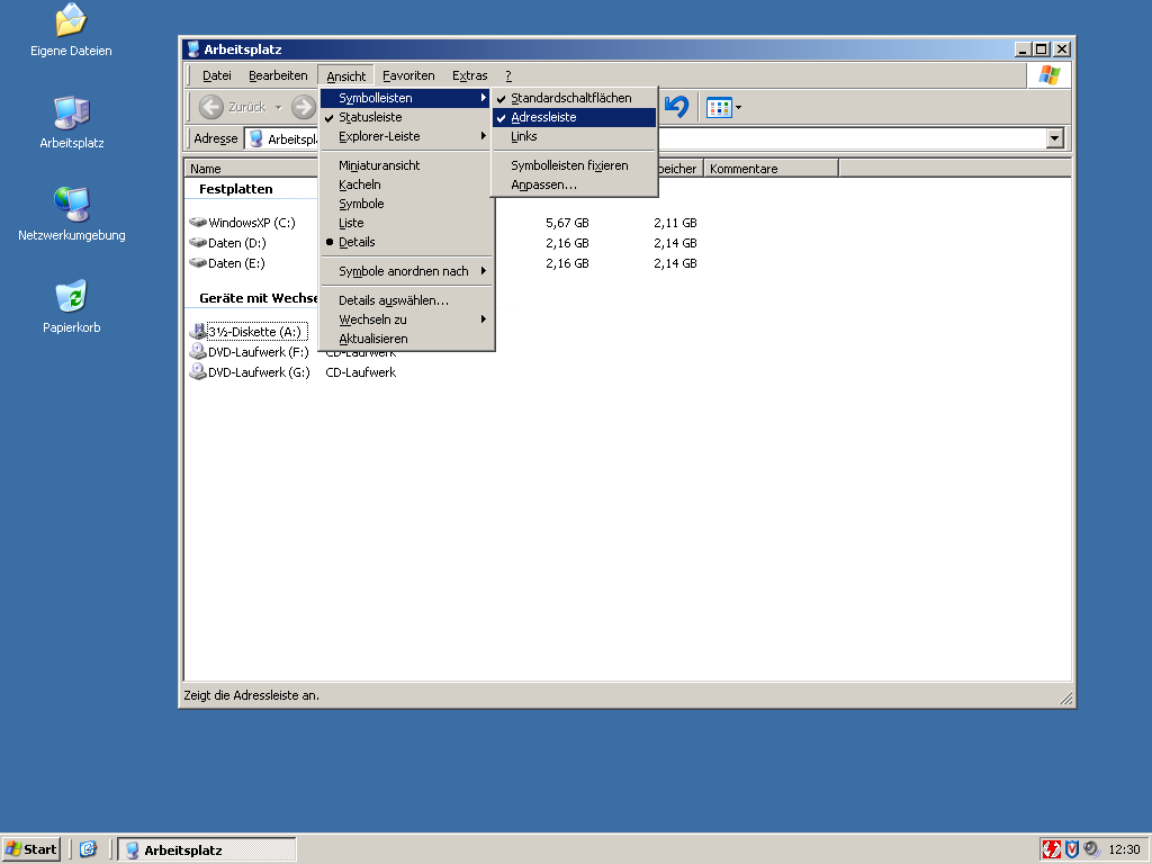
jakzurr 8 hours ago
Yup, pretty sure I've seen the same sorts of things using Asian characters.
Telaneo 8 hours ago
Fair. I just remember them being inconsistent between the English and localised versions of Windows, and given I used both, that turned into a nothing-feature. Another comment mentioned you could edit the underlines in Office 2003, but I never knew that back in the day (or until today for that matter...).
toast0 7 hours ago
It's pretty hard for the shortcuts to be consistent and localized. Especially if you also use different keyboard layouts when you're using different languages...
Even for keys that aren't mnemonic, do you want undo to be ctrl + z or ctrl + the key closest to left shift?
Telaneo 7 hours ago
> It's pretty hard for the shortcuts to be consistent and localized. Especially if you also use different keyboard layouts when you're using different languages...
Hence my original comment. I haven't had a problem with different keyboard layouts, since most of the keys that change are on the outer edge, nowhere near where the most common shortcuts are located (then again, I rarely type using QWERTZ).
> Even for keys that aren't mnemonic, do you want undo to be ctrl + z or ctrl + the key closest to left shift?
CTRL+Z, since that's what it's been since time immemorial, even on ISO keyboards. Consistency is king.
jakzurr 8 hours ago
(Speaking of menu/drop-downs with underlined characters for alt commands.)
> This works poorly if you intend to localise your application. Great if you don't though.
Sure that's true. But remember M$ allowed you to fairly easily edit those underlined-characters in, oh, for example Office 2002 and 2003. Even if you didn't have a lot of default underlines in your current language settings, it is still possible for someone to add their own underline-shortcuts.
Back in those days, the first thing I did on any personal new install of Outlook, was to disable the shortcut that marked all email as being read. (That's cause I hit that button by accident too many times.)
Telaneo 8 hours ago
> Sure that's true. But remember M$ allowed you to fairly easily edit those underlined-characters in, oh, for example Office 2002 and 2003. Even if you didn't have a lot of default underlines in your current language settings, it is still possible for someone to add their own underline-shortcuts.
That's a feature that was hidden from me at least, but honestly, this is a good-ish solution to that problem.
I remember Office having the underlines, but they were inconsistent between the original English and my localised version (and I used both depending on the machine), which made them useless. That wasn't that big of an issue when all the normal keyboard shortcuts are also written out, but it would have been even less of a problem if I knew how to edit them.
prmoustache 10 hours ago
> Devil's advocate: showing the relevant keyboard shortcuts in the UI can be overwhelming
That is not a requirement, having access to menus, a master help shortcut ir fuzzy search actions shorcut are other options.
mixmastamyk 9 hours ago
Another person here is arguing for accessibility, which may have been overlooked.
magicalhippo 11 hours ago
Which, if you made say a regular Win32 application, was guaranteed. These newfangled frameworks dropped the ball, if anything.
kerblang 10 hours ago
Not guaranteed but easy, because Windows has mnemonics, where you can associate arbitrarily nested menus with actions, and each menu can have its own mnemonic key, so that you press ALT, then, say, "k", then, maybe "m" and so on, following along with the menus as they drop down.
This way it becomes easy to memorize key sequences; start by navigating with arrow keys, then eventually speed up as you memorize each menu item's mnemonic key, and if you ever forget, just look at the menu.
It was the keyboard-friendliest idea ever, without requiring any sort of terminal. I'd even say friendlier than MacOS (heresy!!) or, yes, VIM (burn the witch!!!)
magicalhippo 8 hours ago
Even if you didn't have mnemonics, you could use tab, arrow keys and alt if needed, to navigate, and space to "click" buttons and such.
So even if the developer forgot to configure mnemonics, which was as easy as prefixing a letter with ampersand, you could navigate by keyboard. Sometimes tedious but beats not being able.
the_lucifer 4 hours ago
> Not guaranteed but easy, because Windows has mnemonics, where you can associate arbitrarily nested menus with actions, and each menu can have its own mnemonic key, so that you press ALT, then, say, "k", then, maybe "m" and so on, following along with the menus as they drop down.
> I'd even say friendlier than MacOS (heresy!!)
Honestly, I disagree. If you've used macOS for a length of time, you might be aware of the universal menu search system using (cmd+? i.e. cmd+shift+/). Hit that, type the menu item name, and simply hit return to activate it. Doesn't get simpler than that. The alt+ system always feels very janky to me on Windows because on many apps, hitting Alt relayouts the entire app sometimes to show the menu bar on top.
fny 11 hours ago
Power user experience is not the same across disciplines either.
God forbid I should ever be forced to use Blender or Inkscape with only buttons.
prmoustache 10 hours ago
Why do you introduce the concept of being forced to in the conversation?
oasisaimlessly 8 hours ago
Because most people do not get to choose what software they use for working?
prmoustache 3 hours ago
Can we stay on topic? We are in the subject of making UIs keyboard drivable.
eldaisfish 11 hours ago
you are arguing against a strawman.
Most reasonable people want support for both keyboard and mouse-based navigation. For example, why did Edge and possible chrome, remove support for Back via the backspace key? Literally, why remove something that exists and that some people might use?
Same with some web forms where hitting enter in a text box does nothing. I expect it to submit a form, but very often, it does nothing.
chuckadams 11 hours ago
> For example, why did Edge and possible chrome, remove support for Back via the backspace key?
Because people were triggering it by accident all the time. Firefox and Safari don't navigate back on backspace either.
Enter only auto-submits if there's a visible submit button or if there's just one input, and that behavior goes back as far as I can remember.
Balooga 10 hours ago
I'm surprised the person responsible for <backspace> mapping to Back navigation didn't mandate that <del> would be super awesome for Forward navigation.
HappMacDonald 5 hours ago
Nono, that should close the window xD
eldaisfish 9 hours ago
right now, i cannot even enable Backspace = go back on Edge. I am forced to use Edge on my work computer and i hate that this feature is gone. Not disabled, just gone.
About enter to auto submit, i've been running into this problem more often where some web frameworks just ignore the Enter key. There is a submit button, but i cannot trigger it via the enter key.
orbital-decay 9 hours ago
Every small feature is used by some subset of users, but if you don't trim your software from time to time then feature creep will eventually make it incoherent. Yes, it involves even small details like this one. I don't think learning another hotkey is a big problem, and anyone using keyboard navigation on the web should generally be at least aware of a ton of existing Vim-like navigation extensions (and even browsers)
HappMacDonald 5 hours ago
Is alt-left to go back a bad keyboard shortcut for you? It's what I use.
It's also far less likely to be accidentally typed while trying to fill in a form and fumbling the tab navigation.
kbelder 6 hours ago
Yeah, that wasn't an attempt to remove keyboard navigation, that was fixing a painful error in keyboard navigation.
wolvoleo 2 hours ago
Yes it was an error because backspace does function as a backspace when a text input field has the focus. Making something that should be muscle memory context-dependent.
It should have been Ctrl-Backspace or something.
toast0 11 hours ago
> For example, why did Edge and possible chrome, remove support for Back via the backspace key?
Because alt+left is a better choice? Really f**ing annoying when some dumb javascript removes focus from a text box you're editing and the page navigates back.
ethin 10 hours ago
Agreed. I'll say the same about accessibility. People really need to test for this more. If your app is not accessible I literally cannot use your app regardless of how useful it might be. This is pretty much why I currently don't use IDEs like Zed: even if I wanted to I can't because it presents no accessibility tree.
orbital-decay 9 hours ago
> For example, why did Edge and possible chrome, remove support for Back via the backspace key? Literally, why remove something that exists and that some people might use?
Because web pages don't preserve element focus well, web was originally meant for documents in the first place, not UIs. If you're trying to erase a character and the focus has been lost, you go back in history instead. It's a real existing problem in poorly designed pages, not a nefarious plot to annoy power users by Google, Microsoft, or Mozilla. It was always janky as hell.
Telaneo 9 hours ago
I specifically had to disable that via about:config in Firefox ages ago because I pressed it by accident all the time. Often while I was going through a 30 point form, only to then lose all my progress. To be fair, browsers probably should try to not undo progress like that, so you can just go forward again and get right back where I started, but I've never trusted them to actually do that. I've been burned too many times.
I can kinda get that one.
preg_match 9 hours ago
Where this falls apart is commercial software. The issue is we use off-the-shelf frameworks and tools for commercial software. And then we don't train developers on how to write high-volume software.
Commercial software is THE power user use case. Your users will be using your software 8 hours a day, 5 days a week, for years. And still, the software is obtuse point-and-click garbage. Meanwhile commercial software from 25 years ago could be navigated at light speed.
That's part of the reason Excel can't be dethroned. Excel is from the old age of software, and that means that users can input and navigate at light speed. All these fancy tools claim to dethrone Excel, but when you actually use them you realize it's a goo goo ga ga Fisher Price level UI. Extreme amounts of whitespace, buttons hidden behind submenus of submenus (which you have to navigate by eye, by the way!), features stripped, UI constantly shuffling around between updates.
Look, that works fine for a website on the open web where you assume your users have never touched a computer before. That does not work for commercial software.
NooneAtAll3 9 hours ago
I think you vaaastly overestimate how excel is used by most users
if anything, excel exceeds in being MOUSE-driven - it's intuitive in what you press and what you drag
and that's kinda my problem with the TFA - author is not representative of typical user. Mouse interaction is the king
layer8 9 hours ago
Maybe by most users, but not by most users who use it for many hours daily for professional tasks (i.e. not just as a kind of tabular list editor).
preg_match 8 hours ago
Basically everyone in a white collar job who is NOT a developer is using Excel. I'm a developer, even I have to use Excel at work.
marshray 7 hours ago
"Most users" are not who choose business software.
kbelder 6 hours ago
Screwing with a keyboard combo in Excel... like Shift-Space to highlight a row... is like an IDE deciding to swap the key-bindings for '{' and '['. You'd have entire accounting and marketing departments in rebellion.
Devs consistently underestimate how many power users of Excel there are, and often don't understand how they operate.
red_admiral 8 hours ago
> UI constantly shuffling around between updates.
and then 365 came along ... an option to pull stock market data here, a LinkedIn connection there, oh look a wild copilot button appeared.
EA-3167 9 hours ago
No honestly some harshness is warranted, most of the people alive have internet access and a smartphone, this is a more ubiquitous activity than many others we require or expect accommodations from. This site has a lot of good to offer, but sometimes the bubble needs a reality check that their needs and concerns are even more niche than disabilities like
Blindness.
neutronicus 9 hours ago
FWIW, I think it's a blind spot to think of power users as "Arch Linux people" using "developer tooling".
My wife is a UX Design consultant and she had an engagement where a bunch of state government accountants were bemoaning how a redesigned procurement platform took away all their keyboard shortcuts.
Eji1700 8 hours ago
Eh I think things like vimium have kinda solved this.
Push a button, every icon is now labeled with a key, type that key, counts as a click, done.
I get that this does NOT solve for say, someone who's blind (i guess you could announce them, not sure), but it is easy enough I've found even lower tech people are fine with it.
As always, a lot of the trick is communicating the interface and using modern standards, not "Well it's ctrl + insert because that's what it is on linux"
iLemming 6 hours ago
It really is not so much about keyboard vs. mouse - power users vs. average Joes. That all is just a discombobulation that distracts from the main issue and the issue is the accessibility of plain text.
Majority of computer professionals (programmers included) come to appreciate a single fundamental truth about their field way too late into their careers. That the most basic foundational unit, the substrate they need to conquer is text. Everything stems from it. We have to deal with text our entire lives. It doesn't matter where that text appears - in web browsers, in Jira, in Slack, in terminal, in PDFs, Word or LaTeX documents. Code by the way is just structured text. The feeling of empowerment and liberation when you can deal with text on your own terms is a disproportionate multiplier. That's why using multiple cursors feature for the first time feels so amazing, even though the practical cases for it are not that common.
And when I say "text", I don't only describe the process of "grabbing some text" and "piping it" into another process, or manipulating it. It's not only about the input, the act of consuming text is equally, if not more important.
We argue that keyboard-driven UIs are more efficient for the input, but hundreds of memorized shortcuts can't really fix the fundamental problem.
Vendors are designed to own you and ownership can take different forms. Slack app that doesn't let you easily extract code snippets from a thread - owns you. Jira that forces you to use their stupid, quirky wysiwyg editor - owns you. Note-taking app that keeps the data on the cloud ain't your friend. The friction is the ownership. When extraction of text requires effort, the tool has leverage over you. It's a subtler form than data lock-in, it is behavioral lock-in. You adapt your workflow to what the tool makes easy, and gradually the tool's affordances shape what you even think to do. Information gets buried in threads, search is mediocre, export is hostile. The "solution" they offer is to stay there longer - search in Slack, link to Slack, screenshare in Slack, summarize with AI in Slack, don't ever leave Slack. The tool becomes the answer to the problems the tool creates.
And when you get to that point, you'd feel helpless - all your knowledge and muscle memory can't help you there - not only the app is not favoring power-user experience, it's forcing everyone downgrade to the "average Joe" levels.
Most popular editors and IDEs don't give you direct leverage over plain text either, at least not without the effort from your side. Shortcuts, popups, UI elements in the IDE at best are local drivers - you can't easily grab a thing from the outside and feed it to your LLM context in the middle of a task, or insert within a comment in the code - you have to switch, copy, paste, deal with format inconsistencies, manual conversion, etc. Then we keep bargaining what method is the best, fastest and most convenient - using the mouse or keeping the fingers on the home row, modality or complex shortcuts. All for the sake of the problem that's artificially enforced on our workflows.
Terminal-heavy users eventually start appreciating the leverage Unix philosophy grants them over text, but that's still contained within locality, they still have to constantly jump around, while eventually figuring out ways for automating some aspects of it.
Point is - do not give in to the status quo. Liberate your text - deal with it on your terms. Get annoyed whenever you need to switch back and forth just for the sake of finding the piece you need and moving it around - it should be instantaneous and instinctual. Like a boxer moving in a ring and casually throwing heavy punches. Long-time Vim and Emacs users "get it", even though they often don't follow through - some things just never become gratifying instincts. Sometimes, even the opposite forms - like redundant muscle memories. Some outright would reject using a new app because it messes with one shortcut they keep accidentally pressing. Sometimes, I wish there was an agreed standard for every UI - to have only the core, commonly used keys pre-set, while making everything else configurable.
laserbeam 17 minutes ago
> But most people aren’t willing to deal with the learning curve of keyboard-driven GUIs.
Keyboard shortcuts should be an _optional_ way to interact for accessibility and power users! They should never be required!
This is what TUIs get wrong, they make it the required way to navigate and often don’t even let you use the mouse.
YmiYugy 11 hours ago
What does it mean though for a GUI to be keyboard-driven?
The obvious way is that every action simply gets a shortcut assigned.
My counter would be that that is not really keyboard-driven, but merely keyboard-compatible.There is the issue of discoverability. The best practice right now seems to display the shortcuts of buttons in tooltips, menu items, or when pressing a different shortcut.
I’d content that buttons are a fundamental mismatch with keyboards. A keyboard driven UI shouldn’t have buttons.
The issue is that genuinely keyboard driven UIs like CLI or TUI suffer terrible discoverability that being the reason that mouse driven UI exists in the first place. So can we have a keyboard-driven UI that is as intuitive as clicking with a mouse?
Fire-Dragon-DoL 11 hours ago
Oh, finally somebody who gets it!
That was incidentally my major disappointment with vim: it is keyboard driven, but the UX wasn't designed to be a perfect keyboard experience (which I expected, given how old it is).
Some examples of what you are asking for can be found in videogames due to controllers
smoothbraindev 10 hours ago
Even as a fairly confident nvim user, I still use and recommend <https://github.com/folke/which-key.nvim>
DerArzt 10 hours ago
Even as a devoutember of the church of emacs I couldn't live without the emacs version of which-key [1]
[1] I was going to link to a repo, but I just learned that which-key is included in Emacs out of the box.
regularfry 11 hours ago
Yes, they should be discoverable. There are platform conventions for this: on Windows you'll see underlined letters; menus show you the shortcuts. Tab is a pretty much universal "move to next field" shortcut and I don't think that's particularly discoverable if you don't already know it.
There's nothing wrong with a keyboard driven UI having buttons as long as they advertise their key, though. That's one way discoverability is supposed to work. It means you can fall back to the mouse when it makes sense.
orbital-decay 11 hours ago
Since you mentioned Windows, Microsoft made Ribbon which uses Vimperator-style navigation to make toolbars and buttons discoverable as long as you know one hotkey (Alt). It can also be hidden until triggered with a hotkey. This is miles ahead of most discoverability tricks in power user interfaces, including fuzzy command search which is not guaranteed to remain stable as new commands are added.
xg15 10 hours ago
One downside to the ribbons that I see is that they somehow inverted the hierarchy between menus and toolbar buttons: Previously, menus were the slow but predictable way to find a command, and both toolbar buttons and keyboard shortcuts were just that - shortcuts. Menus were a sort of "ground truth" which commands existed. They also had a standard way to be navigable through the keyboard: You can press alt and then simply use the cursor keys.
With ribbons, the menus were gone and the toolbar buttons became the "ground truth", but in a much more haphazard way.
Fuzzy command search goes a bit back to menus, but as you say in a way that's much less guaranteed to be stable.
connicpu 11 hours ago
One of the reasons I loved learning Helix is that it shows you the list of possible next keypresses every time you press the first key in a combo. Amazing for discoverability. It even works for user defined shortcuts!
dietr1ch 11 hours ago
To me spacemacs nails the discoverability aspect through helm-Mx-fuzzy-matching and which-key
No clutter, but hints come as you stutter on what to press next
xg15 11 hours ago
I think a first step would be a sane tab order, so you can easily navigate to a control using tab or cursor buttons. Second step are keyboard shortcuts.
I don't see why removing the buttons would be desirable. All that would do is to make the GUI unusable with the mouse and also make the discovery of the keyboard shortcuts much harder.
ethin 11 hours ago
My logic for determining if a GUI is keyboard driven is pretty simple: if I can fire up a screen reader and completely drive your UI via the keyboard, then by definition your UI is keyboard-driven. If your app ever requires me to emulate mouse clicks to drive it, then it isn't entirely keyboard-driven and that should probably be fixed. This is even something that can be measured/tested for on platforms like Windows where you can both read the accessibility tree (which in itself is amazingly powerful particularly for testing) but you can also simulate arbitrary input.
jerf 10 hours ago
"What does it mean though for a GUI to be keyboard-driven?"
For literally decades after they were state of the art, people who used old-school mainframe TUIs would still swear by them.
I think the key difference is that they would buffer inputs. You could be on the "Receipt" screen, and know that if you needed to enter the code for some rebate receipt or something, you could hit F6 - F2 - down - down - down - {start typing code}, and even if the UI took multiple seconds to actually get to the point that the code was being entered, the input would be kept.
Normal GUIs have discarded this for fairly good reasons. Especially when it comes to queuing mouse clicks. If you get down to the nitty-gritty of what it means to queue a "mouse click" it get very conceptually complicated. But you could create a GUI toolkit that still had the same idea integrated into it for a keyboard interface, if you have well-defined points where you are and are not accepting keyboard input.
I would submit that "keyboard-driven UI that is as intuitive as clicking with a mouse" is actually the wrong direction to cut on. You need to beat the conventional mouse GUI completely in some other dimension, one where it can't even compete. This is the only one I know of that has historical precedent.
The downside is that on a desktop I'm pretty sure you're looking at a completely new widget toolkit. Trying to force this on the current ones is going to be hard and could even be impossible.
If I were going to create a new web frontend framework, this is what I'd focus on to have an actual new feature that isn't just a respelling of the current set of features. And I can't guarantee that it won't also be missing something crucial, though, I think everything you need is actually there. You could even have modern nicities like, store the entire GUI field state transition diagram statically at the beginning and as the user types ahead of the GUI's current state, show them a rendered view of where they are going, e.g., the key sequence I showed above could be "[Rebates] -> [Rebate Receipt] -> [Name Field] -> [Address 1 Field] -> [Address 2 Field] -> [Rebate Code Field] -> [Entering {'A8F2-132A-9283'}]", live updating as it goes so if the user can just bang that out even while the first screen hasn't loaded they can even be sensibly editing the text input they're going to put in.
Combined with something as simple as making sure everything always has a keyboard shortcut in a defined format, which is conspicuously displayed every time you change something, e.g., every time the user clicks the Rebate Code Field you can also display something like "Ctrl-F R" or something so they also learn how to drive the screen with a keyboard and you would, if nothing else, have something different than what's out there today.
Anyone who wants to, steal this idea. I'm not going to do anything with it. I don't see this as something you want in every app necessarily, but people who spend hours a day in the same app for whatever reason would be confused for a week, then I bet you couldn't pry it from them with a crowbar.
wat10000 10 hours ago
The fundamental difference is that mouse input requires unpredictable motor movements. We can't queue mouse clicks because the user doesn't even know where a button is going to appear. Even if they did, the actual physical mouse movement needed to get there is different every time. There is a necessary mouse -> screen -> eyes -> hand -> mouse feedback loop for every action.
Keyboard input can, when designed well, be fully predictable and require no feedback loop with the computer. The motor movement involves a fixed set of physical buttons, which we can fairly easily train to press very reliably, and that training is then universally applicable across all software.
That is why you can buffer keyboard input but usually not mouse input. With keyboard input, I know what the software is going to do and I know exactly what hand movement will get it to do the next thing, so I can perform that movement even before it's ready. With mouse input, it's not really possible.
chrisweekly 9 hours ago
I love this idea. I also just checked out your blog (jerf.org) which also has some gems.
megous 10 hours ago
Keyboard specific focus + navigation, shortcuts, poupable command entry/console (eg ~ in mpv, or quake :D) with commands that interact/integrate with the GUI side.
silon42 10 hours ago
start with CUA standard.
BatFastard 6 hours ago
Its only been around for 50 years, but few people ever consider it.
customguy 10 hours ago
> A keyboard driven UI shouldn’t have buttons.
You mean because they're basically just in the way, right?
I know it's asking a bit much, but IMO advanced software ideally has
- buttons, pretty colors and icons where they make sense
- keyboard shortcuts for everything
- complete documentation that ships with it (sure "it's online anyway".. so find a way to automate putting what you have on the website into the release in a form that works offline)
- preferences to hide some or all buttons/toolbars, turn off the icons, and change some or all keyboard shortcuts. GUI is cool for that, text files are also cool. In other words, why not have everything? Maybe you could even compile a version that strips out all the stuff that can be turned off, or at least hardcodes some preferences, so the compiler can skip some things that are no longer called etc.
Not a must-have but nice-to-have: tooltips for all things and maybe advanced help, so you don't need the documentation as much, or not at all for simple use cases. But if the docs are complete, I think it's fine to keep the program and development process simpler by not duplicating that in tooltips. Don't go out of your way, unless you want to.
But as I said, that's for "advanced software", by which I mean software you spend a lot of time in. Browser, text editor, email client, file manager, graphics software, and so on. With simpler tools I'm usually just happy they exist.
jodrellblank 8 hours ago
We know what it means for a GUI to be keyboard driven now:
Edit with Copilot[1]
Press the Copilot key on your keyboard[2] and type the thing you want to happen on your keyboard in English without leaving the home row. Forget the keyboard shortcuts, the path through the menus, the button location in the toolbar, the command name in the omnibar, the marketing name of the feature. Forget queueing up keyboard keys in an input buffer based on memorising which dialog will popup next, or the tab ordering on this or that screen. DWIM is back, and this time it still isn't determinstic, but it's the way we are going to manage ever-growing software features and task complexity and finally turn computing declarative instead of imperative.
"Move rows with dates from 2020 to the bottom of the table"
"Change the date format in the table from mm/dd/yyyy to yyyy-MM like 2026-Aug"
"Style the table with alternating dark/pale contrasting colour backgrounds and a different header row colour"
[1] https://support.microsoft.com/en-us/word/edit-with-copilot-i...
[2] https://blogs.windows.com/windowsexperience/2024/01/04/intro...
miguel-muniz 7 hours ago
Yes, there should be a difference between keyboard accessible and driven.
Screen readers allow users to use their keyboards and other assistive devices to navigate websites and apps by tabbing through elements with extra controls and shortcuts to skip to regions, interact with elements and such.
To that degree I agree that all GUIs should be keyboard accessible.
This is obviously not what the original author had in mind, if he had to tab through every item in a web app he would probably get frustrated rather quickly. What he is imagining is like TUIs where all the interactions are through keyboard shortcuts and macros. These are not popular with the majority of users of modern day software, especially if the software is something that is used infrequently. I think we take for granted how component we, people who create software, are.
What has become more popular are interfaces that expose extra controls with a single key press, where the user can type to get the result they want. So instead of memorizing the keyboard shortcuts to dozens of actions, you can press something like Crl+K or / to summon a palette where you can search for the action.
tptacek 4 hours ago
It's perfectly possible to design a GUI without button controls, where literally all the interaction is done with keyboard inputs. It's still not a TUI: it has graphical visual layout, and the UI signaling is out of band with respect to the data it's presenting.
usern20260720 14 minutes ago
There used to be a tiny macos app that allowed you to navigate the websites typing letters to follow links instead of needlessly roam your mouse around.
Sadly, macos keyboard navigation is dwindling in interactions like the screen sharing pop up when you plug in a monitor
stevesajeev an hour ago
I think the main reason people prefer TUI are certain assumptions that come with it. Like I assume a TUI runs on vim like shortcuts, allowing me to move with hjkl. It isn't the case everywhere, but it's what I have observed mostly.
When a software is created for the terminal, it can expect the users to know these certain shortcuts. But this cannot be assured for GUI.
laserbeam 21 minutes ago
Most TUIs give you keyboard but mouse is a second class citizen, most GUIs give you mouse but keyboard is a second class citizen. To that extent, I’ll take the mouse only any day. I really want to learn over time the 5-15 shortcuts that speed up my day, not be forced to learn all of them day 0. And I say this as a power user, a casual user will use 2-3 shortcuts per app at most.
xamuel an hour ago
I don't know if it's OSX itself or one of the common GUI engines implementations on OSX, but I notice a lot of apps (including Firefox when you try to save a file which would overwrite another file) will have popup modals with multiple buttons and there's no way to click the non-default button with just keyboard.
For example, in Firefox, trying to save a file when a file by that name already exists, you get a "Cancel" or "Replace" prompt and you can "Cancel" by pressing return, but if you want to "Replace", you apparently HAVE to use mouse or trackpad!?!
marklar423 13 hours ago
I agree but I think being usable by the keyboard isn't enough, because the shortcuts are often hard to discover and remember. I think the ideal is - like good TUIs - GUIs should put obvious hints on screen how to navigate via keyboard.
It would be really great to have some GUI frameworks for the common platforms (including web!) designed to do this and have some opinions on common shortcuts for common actions so we can standardize on something.
OroPla 11 hours ago
Agreed. Also, I would support everyone building off of vim principles. If keyboard bindings are somewhat consistent across applications, that would be really nice and there are already a bunch of options using vim bindings as a starting point, since they make intuitive sense once you've learned the "language" vim uses.
emacdona 11 hours ago
Yeah, keyboard binding consistency is what I really want. Ideally, you could choose between Vim, Emacs, <whatever else> keybindings for the program you're using.
I think what's also needed is a standard way of navigating what I guess I'll call the "focus tree". For example, if I'm running Vim inside of a terminal multiplexer (eg: Zellij) inside of a terminal emulator inside of a tiling window manager (eg: xmonad)...
It would be GREAT if I could use Vi keybindings to navigate windows in whatever "focus layer" I'm at... and then have a "standard" keybinding to navigate up and down that tree (eg: "Ctrl + >" and "Ctrl + <").
Right now, everyone seems to solve the "focus tree" problem by trying to choose a control key combination that won't collide with any other process that might be listening for key chords at the same time.
a-dub 7 hours ago
last time i built a crud app (oh maybe about 24 years ago) i made it a point to do this. i remember watching the payroll people fly through their terminal mode vax vms applications with such speed and dexterity that it would make any unix admin well versed in the art of the command line blush and it made me think "oh yeah, all these 90s point and click guis got it all wrong. if people are required to make heavy use of a system at work, they would prefer a learning curve followed by speed, comfort and dexterity over an easier learning curve that trades dexterity for discoverability."
it was a webapp framework, but... all browsing/listing screens included row ids and a focused text box- so that typing the row id and enter would select. all action buttons had an underline to signify which ctrl-shift hotkey triggered them. all edit screens defaulted focus to the first editable textbox and at no time was the mouse actually necessary. finally, load times were optimized to target 75ms.
amusingly, the user feedback was "the keyboard control is pretty good but can you please make it faster."
what i thought was chrome ended up being critical to the users not being miserable.
Tanoc 2 hours ago
ALT+TAB, TAB, ↓, ↓, ↓, CTRL+HOME.
For a lot of people this is a recognizable pattern. Switch window, select element, scroll down, then snap back to the very top. The keyboard commands above should do the same thing no matter if it's your text editor or your web browser. People should know these are going to work regardless of what they're using. Because these aren't key commands going to the program, these are key commands going to the operating system. The program shouldn't be able to arbitrarily choose whether it abides by these. Consistency is important not only for speed, but for human understanding and capability. If every door had a different way of opening it such as drawing a series of lines or tapping a certain rhythm or belching thirty feet away people would be mentally taxed discovering that particular door's interfacing method, and common tools would not be able to help those who couldn't find the interface or use it because of disability or differing ability. It's only doors with extremely specialized designs like blast doors that have an unusual interface and interfacing method, because they're designed to do one very specific thing that lies far outside of common use cases. Your chatroom program, image viewer, or archive unpacker is not a blast door. Put a door handle on it where everyone expects it to be.
minimeow 10 hours ago
The author makes an excellent point. There are too many poor Terminal UIs created just for the sake of having a TUI. Often these are not well constructed or lack sufficient thought to be effective/productive.
But the broader trend in GUI apps has been to target marketshare not deliver productivity for keyboard users. Back in the 80s and 90s Photoshop, Illustrator etc. became the powerhouses they are today because they focused on allowing professionals to be extremely efficient using their array of powerful keyboard shortcuts. In 2026 when software companies are dying of KPItis scoring their product management on creating compelling subscription models to hook customers, attention to actually delivering productivity for keyboard users is often an after thought. Mobile apps don't have keyboard shortcuts and desktop apps seem to increasingly be treated as as the narrow "edge case" with only a few hundred million target users versus the billions available on mobile devices. It's an opportunity for those who get serious about delivering value by leveraging the power of keyboard shortcuts to make their GUIs highly productive and comprehensively usable from the keyboard. For all their faults, Microsoft got this right with VSCode.
orbital-decay 9 hours ago
Professional and power user software is always keyboard-oriented when it makes sense, I don't see it being ignored. Microsoft even addressed the criticism that Windows was largely not possible to use from keyboard, and massively improved it starting with Win10.
> But the broader trend in GUI apps has been to target marketshare not deliver productivity for keyboard users.
It's not a trend, it's a fallout of Electron being the default choice. Devs that use non-web UI frameworks are aware of keyboard navigation, or at least don't disrupt the builtin thing. And of course what devs that don't target power users tend to do is irrelevant to GUI vs TUI debate in the context of power users.
eviks 12 hours ago
> In fact, many GUI framework application guidelines explicitly encourage GUI application developers
Instead they should be engineered in a way that allows users to bypass those developers in a (at least) framework-consistent way as there will never be a time when they collectively become "keyboard-wise".
ckardaris 11 hours ago
In some cases they do.
For example a GTK app main context menu can be triggered with F10. But this relies on the developer to correctly "tag" said context menu.
In simple cases it is obvious what to do, but in more complicated designs, where you may be able to achieve the same visual output in different ways, it may not be so obvious.
In that case, it is up to the developer as well to read and try to follow the published guidelines.
eviks 3 hours ago
So in none of the cases they do - it shouldn't depend on any tags, that's the whole point of bypassing the app devs!
(not that the tags shouldn't exist, they can make customization easier, just that they shouldn't be necessary for any framework menu components)
What complicated designs do you have in mind?
lunar_rover 3 hours ago
Sadly, even interfaces that do support keyboard navigation tend to implement it poorly. Microsoft Office is probably the gold standard here, almost everything can be navigated using mnemonics, all keypresses are buffered and the user seldom needs more than 5 presses to get anywhere.
xyzsparetimexyz an hour ago
I wish that every app had the StarCraft system where the letter to press a button is indicated. Like:
- New *G*ame - *S*ettings - *Q*uit
Ideally keys should be centered around an area of the keyboard and not just the first letter.
jolmg 11 hours ago
> While it’s true that if you randomly pick a GUI and a TUI application, the latter is more probable to be fully keyboard-driven, this does not tip the scale in favor of developing TUIs over GUIs3. What it does is highlight the inadequacies of keyboard navigation in many GUI applications.
Something to consider is a terminal that has keyboard navigation of its own. Through a terminal shortcut, I can move the cursor at will and copy any text at all, even if it's part of the interface of a TUI. If I want to copy the filepath of the file I'm working on in vim to then use in a shell, for example, it takes like 5 keys to copy it straight off vim's statusbar. A graphical text editor can display the filepath in a tab or something, but I can't copy the text off the tab.
I don't know if I'm alone in this, but it's very frustrating to want a piece text, see it in front of you, and you can't copy it because the developer for one reason or another didn't implement copying of that text, so you have to type it out even if it's right there.
Sometimes it seems on purpose too. For example, when a game on Steam gets updated terms of use, you get presented with a window showing the terms, but you can't copy them to save them. It's like the purpose is to just accept and forget the terms. A TUI can't prevent the user from copying text by its very nature.
Any terminal can implement this kind of arbitrary-text keyboard navigation on its own and have it work for all TUIs. Were e.g. GTK to implement something like this, it would only work for GTK apps, not for all GUI apps. This is exclusive of TUIs because TUIs are text-driven while GUIs are pixel-driven.
ckardaris 11 hours ago
Any text-centric action will have a great advantage when done inside a terminal. I would think the equivalent in GUIs would be first-class OCR support on the compositor level. I am not informed about any progress made in that region to be honest, so I cannot tell how close we are (or not) to this.
jolmg 10 hours ago
OCR will always ultimately be guesswork. It's up to the font used whether 1/I/l/| or O/0 or -/‒/–/—/― can be differentiated.
orbital-decay 11 hours ago
>A TUI can't prevent the user from copying text by its very nature.
Funny but I struggle with copying anything in most recent TUIs. Fancy padding or multiplexer borders and multiple lines of text? It breaks. Incomplete text in a spreadsheet column (tabiew) or a narrow internal window? It breaks. Ohmypi literally has a separate command to copy the prompt because of that, and another command to copy the model reply. TUI is just a poor choice here, it doesn't play well with formatted text like markdown, UI controls, long text, and so on. Terminals are good for CLI where the text is presented as lines, not TUI with spaced layout.
>Any terminal can implement this kind of arbitrary-text keyboard navigation on its own and have it work for all TUIs. Were e.g. GTK to implement something like this, it would only work for GTK apps, not for all GUI apps. This is exclusive of TUIs because TUIs are text-driven while GUIs are pixel-driven.
Terminal navigation has nothing to do with TUI navigation. Most TUI apps suffer from terrible NIH and end up with their own homegrown incompatible keyboard navigation schemas you need to learn every time. Of course absolutely nothing prevents you from writing a TUI framework with a common schema, at which point you will be at the mercy of the dev using this or that framework and schema, same as with GTK and Qt. None of this is unique to TUIs or GUIs.
charles_f 8 hours ago
Couldn't agree more, but I think it's majorly a "geek" thing. I'm using i3 on my personal linux and aerospace on my work mac ; vimium in the browser, Neru on the other apps (does something similar to Neru). I recently ended up finding a way to create user-scripts for electron app and since then I'm adding vimium-esque extensions (e.g. in Teams) wherever I go.
I wish this was a default, but also that there was more of a standard to navigate UIs. That's why I really like vimium and other similar extensions, it's following the vi logic across websites, rather than having to learn everyone's idea of how to navigate.
jakzurr 8 hours ago
"Just as it should be possible to perform every action with a pointing device, every action should also be possible with the keyboard."
"It should be possible to move around and interact with every part of your user interface using the keyboard."
Yes, finally. It works both ways; when I have hold of the mouse, I don't want to reach for the keyboard, and vice versa. Windows has had this problem for ages, and probably always will. There are some workarounds, "ctrl-esc" (I do this all the time) and "windows-button", but some of them require really jumping through hoops.
Decabytes 10 hours ago
I moved to KDE from Gnome for a variety of reasons, but I genuinely miss Gnome and Native GTK apps. They weren't as customizable, but the features you did get work so well.
One of my main issues with KDE is that the default keybindings for desktop operations feel like they were designed by people who don't navigate their desktop with a keyboard.
Then there are little things like in Gnome the screenshot implicitly copies to the clipboard, while in KDE you have to click the copy button. There are just little points of friction I experience in KDE that make me yearn for Gnome's workflow. I think my ideal world I would have a KDE desktop that used all the Gnome shortcuts, and worked more like Gnome.
bombela 9 hours ago
You can set your own shortcuts in KDE. And there is a setting in the screenshot tool to auto copy to the clipboard.
iammattmurphy 6 hours ago
I recently had a revelation when I made an extended qwerty midi controller app that permanently shows the states and functions of all keys including when modifiers are held.
It occurred to me that this is a wonderful way to design software: you immediately know the keyboard shortcuts because you’re already looking at them. I’m working on taking what I’ve built for the qwerty midi keyboard controller (which is built on hammerspoon) and making it just a generic interface for any kind of app.
If the end goal is navigating and controlling the app via keyboard shortcuts, so why not bake that into the design of the GUI itself?
My project if you’re curious: https://github.com/mattdanielmurphy/qwerty-midi-hammerspoon
tracerbulletx 11 hours ago
This is a very narrow viewpoint, considering the majority of computing is done on touch screens now. Sometimes keyboard controls are critical, sometimes they're not, sometimes your users don't care, sometimes they do. Sometimes a pointer is a better human interface for something, sometimes a purpose built controller is, sometimes a multi touch sensitive touchpad is. I wouldn't make an FPS that was just keyboard controls and the same is true of some other types of UIs. Just measure it and be creative and empathetic to how people will use your product who aren't like you and consider the physical interactions as a part of your design space and not just the software.
BeetleB 12 hours ago
Mildly off topic, but getting to the original GUI vs TUI debate: Speed can also be a factor. I've yet to find a GUI file manager that is better than Midnight Commander/Far. I think there are some graphical orthodox file managers, but I could never do things as quickly in them as I could in mc.
So sure, add keyboard support to the GUIs. That's always a good thing. Just make sure they're also as responsive as in a TUI. Dialogs should appear instantly, etc.
The other headaches I've had with GUIs (in Linux) is the appearance can change if an underlying library changes. Even if I haven't upgraded the SW, if I upgrade one of the toolkits it relies on the app's appearance and behavior can change.
Somehow this is never an issue with TUIs.
sjbzbeiks 33 minutes ago
I mean like the original article, I gotta say, Tabs vs Spaces.
I just prefer TUIs, I think if you prefer GUIs you should very much use them and ask for more of them, but if you prefer TUIs please do use those too. I could go into all the reasons I prefer TUIs but this is a HN comment not a manifesto.
Please just use and develop what you prefer.
ivanjermakov 12 hours ago
Three levels of GUI workflow operation: touchpad < mouse < keyboard. This is the main reason people fall in love with programs like vim: with enough experience it allows one to completely eliminate interface friction.
zomiaen 10 hours ago
I work for a company that for years has had a very old-school, terminal style POS. Lots of key shortcuts. Like, black/white text terminal POS.
The folks who learn how to use it well navigate through it faster than the system can process their inputs.
The new system has lots of fancy GUI, but is slower, and the folks used to their shortcuts hate it. But it's so much faster to train people to use.
gfalcao 32 minutes ago
reasonably sound and soundly reasonable :)